AI workflow design

Find out what AI should actually do in your business, and what it should not

We map the work your team actually does, mark every step a model can take over, and tell you which tool fits each one and which are not worth automating yet. You leave with a build order and a cost, whether or not we build it.

Most AI projects fail at the first question, not the last one. Teams buy seats, run a pilot on whatever was easiest to demo, and end up with a tool nobody uses on work that never mattered. The build was usually fine. The choice of what to build was never made properly.

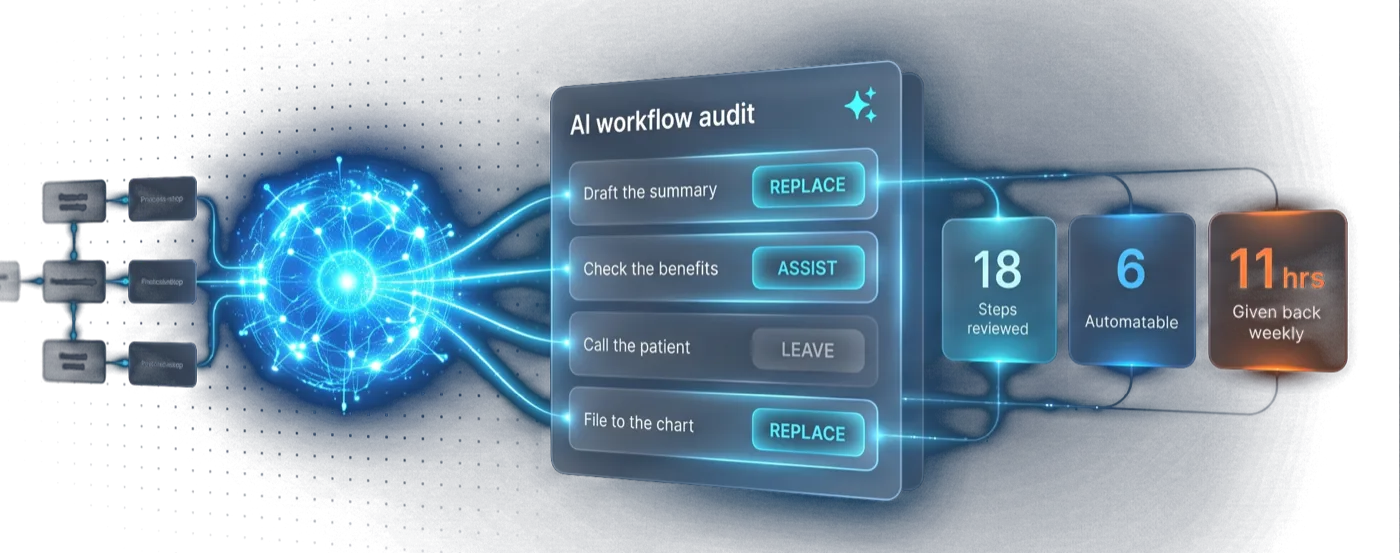
We start from the workflow instead of the technology. Every step gets one of three verdicts: replace it, assist it, or leave it alone. Each verdict comes with a reason, a tool, and a number, so the decision survives a conversation with whoever controls the budget.

It is the same method behind our free Salesforce org audit, pointed at how the work runs rather than how the org is configured.

Who this is for

Built for teams like yours

Leaders who keep hearing 'use AI'

You have no way to judge which work qualifies, so every proposal sounds equally plausible.

  • A written list of steps AI can take over, and the ones it should not touch
  • Cost to build separated from cost to run, per workflow
  • A sequence based on payback, so the first project is the one that pays

Teams already paying for AI seats

Licences are live, adoption is not, and nobody can say what the tool was supposed to do.

  • Where the seats you already own can do real work today
  • The workflow redesign that adoption actually depends on
  • Governance and evaluation, so the output can be trusted

Teams with one automation that worked

The first one landed and there is no principled way to pick the second.

  • A ranked backlog rather than a list of ideas
  • The pattern behind the one that worked, made repeatable
  • Where the ceiling is before the architecture has to change

Capabilities

How we decide what AI should do

Work audit

We watch the real process and time every step, including the parts nobody documented. The list of candidates comes from evidence rather than from whoever is loudest about AI.

Replace, assist, or leave alone

Every step gets one of three verdicts and a reason. A step that needs judgement on unstructured input is a different problem from a step that just moves data, and the difference decides both the tool and the cost.

Tool fit, per step

Claude, ChatGPT, Agentforce, Flow, a workflow tool, or plain code. Named per step, with why it fits and what it costs to run at your volume. Consumption pricing means the wrong tool on a high-volume step gets expensive quietly.

Build order, then the connection layer

Sequenced by payback rather than novelty. Then the plumbing: connecting assistants to Salesforce and the systems around it, scoping what they can see and change, and testing against your real workflows before anyone relies on the output.

Outcomes

Numbers with stories attached

Every figure below comes from a client engagement and is attached to the operating system that produced the change.

100+

Clinical paperwork that fills itself in

Intake, consent, and clinical forms for a healthcare organization now generate from the patient record instead of being typed by staff: 100+ document types, no re-keying, nothing missed.

Runs daily

AI operating a live rental business, with hard limits

A Caribbean car-rental franchise wanted AI in daily operations, not a demo. Their staff now works through an AI assistant that reaches reservations, fleet, payments, and vehicle tracking. Customers can shop through a public assistant that can only look, never touch. Anything that moves money or deletes a record requires a deliberate second switch. It has run daily operations since launch.

We built one

Our own Salesforce AI product, running in real orgs

ApexGenius is proof we ship what we sell: the Salesforce admin MCP. It lets Claude and ChatGPT administer and develop a live Salesforce org with guardrails on what they are allowed to touch, and answers plain-English questions about what is in the org, what is connected, and what would break. When we advise you on connecting AI to Salesforce, it's because we built the thing and run it, not because we read about it. Access is logged and sensitive data redacted; the product is working toward HIPAA compliance.

GAT Solutions helped build the Salesforce system almost entirely from scratch, with thoughtful solution design, clear communication, and dependable delivery.

Greenfield Salesforce system · Verified client review

How we deliver

From operating problem to a system your team can run

  1. 01

    Map the operating friction

    We start with the workflow, not the feature request: where work stalls, ownership breaks, data loses meaning, or teams compensate by hand.

  2. 02

    Build the smallest system that works

    Senior consultants design and ship the build in weeks: Salesforce, integrations, and AI where it earns its place.

  3. 03

    Make the system operable

    Documentation, enablement, controls, and instrumentation ship with the build so your team can run it and see what is working.

Questions

Frequently asked questions

How do you decide what AI should not touch?
A step stays human when being wrong is expensive and hard to detect, when the input is a judgement call the business has never written down, or when the volume is too low to repay the build. We write the reason next to the step, so the decision can be revisited when the volume or the model changes.
Do we have to buy Agentforce?
No. Agentforce earns its place when a step needs judgement on unstructured input, or has to answer a person conversationally inside Salesforce with grounding in your data. Deterministic, high-volume steps are usually cheaper and more predictable in Flow or a workflow tool. Most real workflows want a mix, and the point of the audit is telling you which is which.
What does it cost to run, not just to build?
This is the question that surprises people. Consumption pricing charges per action, so a six-step workflow costs six times a one-step workflow every time it runs. We model the run cost at your actual volume before recommending anything, because the tool that is cheapest to build on is often not the cheapest to operate.
What if our data is not ready?
That is a normal finding rather than a blocker. The audit separates the workflows that are blocked on data quality from the ones that are not, so you can ship what works now while the cleanup happens. Assuming the data is fine is how pilots end up producing confident, wrong answers.
Do you build it, or only advise?
Both, and you are not obliged to use us for the build. We run our own Salesforce AI product in production, so the recommendations come from operating this category rather than reading about it. If you take the plan elsewhere, it is written so someone else can execute it.

Free Salesforce org audit

Before you buy AI seats, find out what is actually worth automating.

  • You leave with
  • An org health read: what is solid, what is fragile, the cost
  • An AI-readiness map for your real workflows
  • A prioritized roadmap with a fixed quote for the next phase