
Why hard-coded endpoints and secrets are risky
A callout needs an address and proof of who is calling. Teams often put both where code can reach them: an Apex string, a custom setting or a custom metadata record. That works on day one, and the cost shows up later.
// Risky: the address and the secret sit in source control.HttpRequest req = new HttpRequest();req.setEndpoint('https://api.example.com/v1/orders');req.setHeader('Authorization', 'Bearer YOUR_TOKEN_HERE');- Anyone who can read the code can read the secret. Salesforce says source code is a poor home for sensitive data because anyone with access sees it in clear text (Storing Sensitive Data).
- The secret travels. Apex and custom metadata are deployable metadata, so a value stored there lands in git history and moves with every release.
- Settings are readable. Public custom settings and custom metadata types are open to Apex, formulas, flows and the API for users with Customize Application or a granted permission (Protection and Privacy Options for Custom Metadata Types). The Protected setting only protects inside a managed package; in an unmanaged package it behaves like public (Protection and Privacy Options for Custom Settings).
- Your code owns the sign-in. With a plain URL you must add a Remote Site Setting and handle authentication yourself, which Salesforce calls less secure and especially complicated for OAuth (Understand Legacy Named Credentials).
Salesforce's direction for an org's own code is plain: outside a managed package, use named credentials or encrypted custom fields for secrets, and it does not recommend encrypted custom fields for authentication data (Storing Sensitive Data). The exception is a package publisher who must hide a shared secret from subscribers, since users with customized application permissions can view named credentials. Salesforce points those publishers to protected custom metadata types inside a managed package.
A named credential takes the URL, the secret, the token handling and the Remote Site Setting out of the job. What is left in Apex is a name:
// Salesforce adds the address and the sign-in at run time.HttpRequest req = new HttpRequest();req.setEndpoint('callout:Orders_API/v1/orders?status=open');req.setMethod('GET');HttpResponse res = new Http().send(req);The parts and what each one means
Five parts do the work. The last column is the one that surprises people on their first deploy.
| Part | The question it answers | Moves between orgs? |
|---|---|---|
| Named credential | Where does this call go? | Yes, as metadata |
| External credential | How does Salesforce sign in? | Yes, as metadata |
| Principal | Who signs in, and with what secret? | The definition does; the secret does not |
| Permission set principal access | Which users may use it? | Yes, in the permission set |
| User External Credentials | Can this user's callout reach the stored token? | The object access does; the tokens do not |
Named credential: where to call
Salesforce describes it as a named connection to an outside system (Named Credentials Schema). Its URL must start with https:// and can include a path but no query string. Your callout can add a path and a query string of its own (Create or Edit a Named Credential). It also holds the callout options covered below and points to one external credential.
External credential: how to sign in
This holds the authentication protocol, the settings that protocol needs, and a list of principals (Named Credentials Glossary). More than one named credential can share it, so two APIs from one vendor can use a single sign-in. Keeping sign-in here also means a security policy that changes secrets on a schedule needs no code change.
Principal: who signs in and where the secret lives
A principal is the actor that connects to the outside system: a single service account or integration user, or an individual person (Named Credentials Glossary). Under client credentials, the client ID and client secret are fields on the principal.
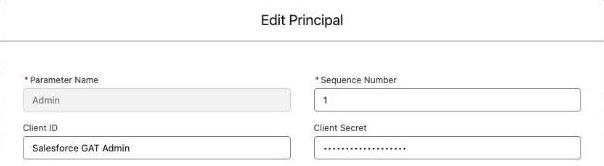
- Named principal. One identity shared by all users in the org. An admin sets it up once.
- Per-user principal. Each person signs in for themselves, from the External Credentials page in their personal settings, and can revoke their own access.
Choose before you save. You cannot change a principal's name or identity type later; you delete it and create it again (OAuth External Credential with the Client Credentials with Client Secret Flow).
Authentication protocol and flow
The protocol is the method of signing in. The choices are OAuth 2.0, Basic, JWT, AWS Signature Version 4, Custom and No Authentication (Authentication Protocols for Named Credentials). OAuth 2.0 then asks for a flow:
| Flow | How Salesforce gets a token | Identity type |
|---|---|---|
| Browser Flow | A person signs in through a web browser, using an authentication provider | Named or per-user |
| Client Credentials with Client Secret | Exchanges a client ID and client secret for an access token | Named only |
| Client Credentials with JWT Assertion | Exchanges a client ID and a signed JWT for an access token | Named only |
| JWT Bearer Flow | Sends a signed JWT to the provider and receives a token | Named or per-user |
Client credentials is the usual fit when Salesforce is a client of another system and you want service-level access for the org instead of access per person. You save the provider's Identity Provider URL on the external credential. By default Salesforce sends the client ID and secret in the authorization header. Turn on Pass client credentials in request body if the outside system expects them there. If either value has special characters, URL-encode it before you save (OAuth External Credential with the Client Credentials with Client Secret Flow).
Permission set principal access: who may use it
Salesforce puts it this way: external credentials authenticate users, and permission sets authorize them (Named Credentials Schema). In a permission set, open External Credential Principal Access and add the principal. At run time Salesforce checks the user has that access before it reaches the outside system (Enable External Credential Principals). If a user holds more than one principal for a credential, the sequence number sets the order.
The UserExternalCredential object: where tokens are kept
Tokens are stored encrypted in this object. Each user who makes a callout needs access to it through a profile or permission set. Most standard permission sets and profiles have that by default. Guest user profiles and some custom permission sets need it granted by hand (Enable User External Credentials). The level depends on the protocol. For an OAuth 2.0 named principal, including client credentials, callout users need Modify All Records so Salesforce can store refreshed tokens for them. Users still cannot open or change the credential in Setup (Permission Concepts for User External Credentials). Nobody reads these records through SOQL, Apex or the APIs.
callout:Name in Apex
A named credential URL is the scheme callout:, the credential's name, an optional path and an optional query string. The Apex stays the same whichever authentication you choose (Named Credentials as Callout Endpoints), and Salesforce lets you skip remote site settings for that site. Named credentials also work in external data sources and External Services.
Generated authorization header and custom headers
By default, Salesforce generates an authorization header and applies it to every callout. Turn off Generate Authorization Header only if the endpoint does not support that header, or if you build it yourself in a custom header named Authorization or in Apex (Create or Edit a Named Credential).
Custom headers cover services that want something else, such as an API key header. Salesforce advises putting them on the external credential in most cases, so every named credential that shares the sign-in behaves the same way (Use Custom Headers with Credentials). To use credential fields as formulas in a header, turn on Allow Formulas in HTTP Header, which defaults to off.
Authentication Status: Configured and Not Configured
This field tells you whether every required step is finished. Not Configured means more work remains before the credential can make authenticated callouts. Configured confirms setup only: Salesforce says it does not verify that the connection to the outside system works (Understand the Authentication Status for External Credentials). The Custom protocol always shows Unknown, because Salesforce cannot tell when an admin-defined protocol is complete. So a real test callout is the only proof.

How a callout flows from Apex to the outside service
Here is one call using client credentials and a named principal.
One callout, from Apex to the outside service
Apex names the credential
The code sets the endpoint to callout:Orders_API/v1/orders. It holds no URL and no secret.
Salesforce finds the real address
The name resolves to the URL saved on the named credential, plus any path and query string from the code.
Salesforce checks the running user
The user needs access to the principal, and access to User External Credentials.
Salesforce gets a token
It sends the client ID and secret to the identity provider URL and stores the access token encrypted.
Salesforce adds the headers
It generates the authorization header, adds any custom headers and sends the request.
The outside service answers
The response returns to Apex. A 401, or a status code you listed, makes Salesforce refresh the token.
The outside service gets a signed-in request, and your code never held the secret.
Legacy named credentials and how they differ
A legacy named credential puts the URL and the sign-in in one definition. In Winter '23 Salesforce introduced the split model described above. Its pages now say legacy named credentials are deprecated, no longer updated or enhanced, and unsupported in future releases (Understand Legacy Named Credentials). We found no end date on those pages.
Three differences matter in practice. An external credential can be shared, while a legacy definition stands alone. The Basic and Custom protocols exist only on the new model, and Salesforce notes that Basic adds the security of permission set assignments over the legacy-only Password protocol (Authentication Protocols for Named Credentials). Apex uses the same callout: syntax for both, so in our experience the work of moving sits in Setup and permission sets.
What the split means in practice
Secrets stay out of git and deploys
Named and external credentials are metadata, so their shape moves between orgs like the rest of your source. The sensitive part does not. Salesforce says the standard Metadata API cannot render tokens in plain text, and packaged credentials do not include the tokens or certificates callouts need (Populate External Credential Principals).
The result is a step teams forget. After a deploy the credential exists in the target org with no secret in it, and a person has to enter that org's value in Setup. The Connect REST API can do it instead, if your team has a safe place to run that from. Put the step in the release checklist, with a named owner for each org. You can also give each org a different URL under the same credential name, so one Apex class works in development and production with no environment check (Create or Edit a Named Credential).
Sandbox refresh
Plan to re-enter the secret after every refresh. Salesforce's reconnection article for its Quip integration says a refresh resets OAuth tokens and external authentication credentials stored in the sandbox (Reconnecting the Quip and Salesforce Integration after a Sandbox Refresh). We found no Salesforce page that states this for external credential principals specifically, so treat the status field and a test callout as the check. A refresh also copies production, so confirm the URL on each named credential points where a sandbox should.
Rotation
Issue the new secret at the outside service, then open the principal on the external credential, choose Edit from the Actions menu, enter it and save. No Apex changes and no deploy runs. Do it in each org that holds that secret, and finish with a real callout.
Revoking access
- One person: remove the permission set that grants the principal. The run-time check then stops their callouts.
- Stored tokens:
ConnectApi.NamedCredentials.deleteCredentialremoves a user external credential and its tokens, and Salesforce gives an employee leaving as the example (Enable User External Credentials). - Everyone: revoke the client or key at the outside service, which ends the sign-in for that whole credential.
Who can use a credential
Access follows permission sets, so the assignment list is your answer. To reach many users, Salesforce suggests adding the permission set to a permission set group. Guest users can use a credential only when it has a named principal (Enable User External Credentials). Remember that a named principal is one identity to the outside service, so its logs cannot show which Salesforce user made a call unless you send that in a custom header.
Common failures and what to check
| What you see | What to check |
|---|---|
| Status shows Not Configured | The required fields for your flow. For client credentials: identity provider URL, client ID, client secret. Per-user browser flows also need one user to sign in |
| Callouts fail for some users | Both permissions: principal access, and the right level on User External Credentials. Salesforce says callouts can fail without both |
| Fine in the source org, fails after a deploy | The principal in the target org. Its secret did not come with the metadata |
| Status is Configured, sign-in still fails | The values at the outside service, special characters that need URL-encoding, and whether it wants credentials in the request body |
| Expired token never refreshes | Whether the service returns a non-standard code such as 400 instead of 401. List it in Additional Status Codes for Token Refresh |
| Service rejects the authorization header | Generate Authorization Header, and whether a custom header named Authorization is meant to replace it |
| A formula in a header does not resolve | Allow Formulas in HTTP Header, which defaults to off |
| A managed package cannot call out | Allowed Namespaces for Callouts. Credentials created or updated from Apex also need Enabled for Callouts turned on |
Most of these rows come from Salesforce's troubleshooting page (Troubleshooting for Named Credentials) and its status guide. Work top to bottom, because the early rows stop a callout before it leaves Salesforce and the outside service never logs it.
Where to start in your own org
When we review an org's integrations, this is the order we use.
- Search Apex, custom settings and custom metadata for
https://hosts and anything that looks like a token. - List Remote Site Settings. Each entry may be a callout that bypasses a named credential.
- List legacy named credentials and plan their move.
- For each credential, write down its owner, who enters the secret in each org, when it rotates, and which permission set grants it.
The pattern applied: one credential to a gateway
Calling each outside app directly means one credential, one secret and one rotation per app, in every org. A gateway reduces that count. Salesforce keeps one credential that points at the gateway, the gateway holds each app's own sign-in, and Apex asks for the app it needs.
 Your Salesforce org
Lightning web component
The button your user clicks
Apex class
Names the credential. Holds no key.
Named credential
Your API key sits on its principal, locked in Setup.
 ApexGenius
Checks what this agent may use, then runs the call in the app.
 GitHub
 Jira
 Slack
Each app's own token stays here, out of Salesforce.
We build one of these. ApexGenius brings your apps and skills into one connection you can take from agent to agent, and Apex can call that connection too. Salesforce stores one ApexGenius key through client credentials, so it holds no separate GitHub or Jira token. Everything above still applies: the principal, the permission set, the User External Credentials access and the per-org key entry. The app must be connected in ApexGenius and the key must be allowed to reach it. The gateway also joins the call path, so weigh that dependency like any other. The steps are in how to set up ApexGenius with a named credential.
Frequently asked questions
What is a named credential in Salesforce?
A named connection to an outside system. It holds the callout URL and links to an external credential, which holds the sign-in details. Apex refers to it by name, so the URL and the secret stay out of the code.
What is the difference between a named credential and an external credential?
The named credential says where to call. The external credential says how to sign in: the authentication protocol, its settings and its principals. Several named credentials can share one external credential.
What does a principal do on an external credential?
It is the actor that connects to the outside system. A named principal is one identity shared by everyone in the org. A per-user principal gives each person their own sign-in. A permission set or profile decides which users can use it.
What does Not Configured mean on an external credential?
A required step is unfinished, so the credential cannot make authenticated callouts yet. With client credentials, check the identity provider URL, client ID and client secret. Configured means setup is complete. It does not prove the outside system accepts the sign-in.
Do named credentials deploy with their secrets?
No. The named and external credential definitions are metadata and can move between orgs. Tokens, secrets and certificates do not travel with them, so each org needs its values entered in Setup or through the Connect REST API.
Do I need a Remote Site Setting for a named credential?
No. Salesforce lets you skip remote site settings for the site defined in the named credential. A callout to a plain URL does need one.
Sources
Salesforce Help and developer documentation, read 4 November 2026.
- Named Credentials Schema
- Create or Edit a Named Credential
- OAuth External Credential with the Client Credentials with Client Secret Flow
- Authentication Protocols for Named Credentials
- Enable External Credential Principals
- Enable User External Credentials
- Permission Concepts for User External Credentials
- Understand the Authentication Status for External Credentials
- Use Custom Headers with Credentials
- Understand Legacy Named Credentials
- Troubleshooting for Named Credentials
- Protection and Privacy Options for Custom Settings
- Protection and Privacy Options for Custom Metadata Types
- Reconnecting the Quip and Salesforce Integration after a Sandbox Refresh
- Named Credentials Glossary
- Populate External Credential Principals
- Named Credentials as Callout Endpoints
- Storing Sensitive Data