
Salesforce calls this phishing-resistant multi-factor authentication (MFA) for privileged users, and it runs beside a second change: MFA for every employee login. Both are described in Salesforce's enforcement articles (Prepare for Phishing-Resistant MFA Enforcement for Privileged Users including Admins, Salesforce, published 14 Oct 2026) and (Prepare for MFA Enforcement for All Employee Users, Salesforce, published 14 Oct 2026). For an admin, the questions are who is covered, which methods pass, how to enroll everyone, and how to get a locked-out admin back in.
A different login error? Match it to its fix in Can't log in to Salesforce?
Who does the passkey requirement apply to?
Salesforce treats a user as privileged when they have the System Administrator profile or any one of four permissions, including through a permission set: Modify All Data, View All Data, Customize Application or Author Apex. The rule covers direct username and password logins and SSO logins, in production and sandbox orgs. It also covers internal users with a standard license when they log in to an Employee Community or another Experience Cloud site, and Chatter Plus users.
External users with Experience Cloud licenses, Chatter External and Chatter Free users are outside it (Prepare for Phishing-Resistant MFA Enforcement for Privileged Users including Admins, Salesforce, published 14 Oct 2026). Everyone else on a standard license falls under the MFA-for-all rule, where Salesforce Authenticator and authenticator apps still qualify.
When did enforcement start for your org?
Salesforce staggered production by release group. To find yours, look up your instance, then the release group it maps to in the table at the end of Salesforce's article.
| Release group | Start | End |
|---|---|---|
| Sandboxes (Preview) | 10 July 2026 | 10 July 2026 |
| R0 | 20 July 2026 | 20 July 2026 |
| R1 | 27 July 2026 | 28 July 2026 |
| R2a | 29 July 2026 | 30 July 2026 |
| R2b | 3 August 2026 | 3 August 2026 |
| Japan and Korea | 1 September 2026 | 1 September 2026 |
| All others not listed | 3 September 2026 | 3 September 2026 |
Salesforce's 23 July update moved R1 to 27 and 28 July. The MFA-for-all schedule uses the same dates except R2a, 10 to 17 August, and R2b, 10 to 13 August (Prepare for MFA Enforcement for All Employee Users, Salesforce, published 14 Oct 2026).
Which login methods count as phishing-resistant?
Salesforce sorts every login into three tiers. Only the first lets a privileged user in.
| Tier | Direct login methods | Example SSO signals (AMR or ACR) | Privileged user |
|---|---|---|---|
| Phishing-resistant MFA | Security keys (WebAuthn), built-in authenticators such as Touch ID or Windows Hello, admin-generated temporary verification codes | fido, fido2, hwk, passkey, pki, smartcard, x509 | Logs in |
| Standard MFA | Salesforce Authenticator, TOTP apps such as Google or Microsoft Authenticator | mfa, okta_verify, rsa, timesynctoken | Blocked until a phishing-resistant method is enrolled |
| Weak or no MFA | No MFA | pwd, sms, tel, email | Blocked until a phishing-resistant method is enrolled |
Salesforce's FAQ adds cloud-synced passkeys from FIDO2-compliant password managers such as 1Password, Bitwarden or iCloud Keychain, and certificate-based authentication with x.509 client certificates. The signal lists are longer than shown here and Salesforce says they are subject to change (Prepare for Phishing-Resistant MFA Enforcement for Privileged Users including Admins, Salesforce, published 14 Oct 2026).
What does an admin see at login now?
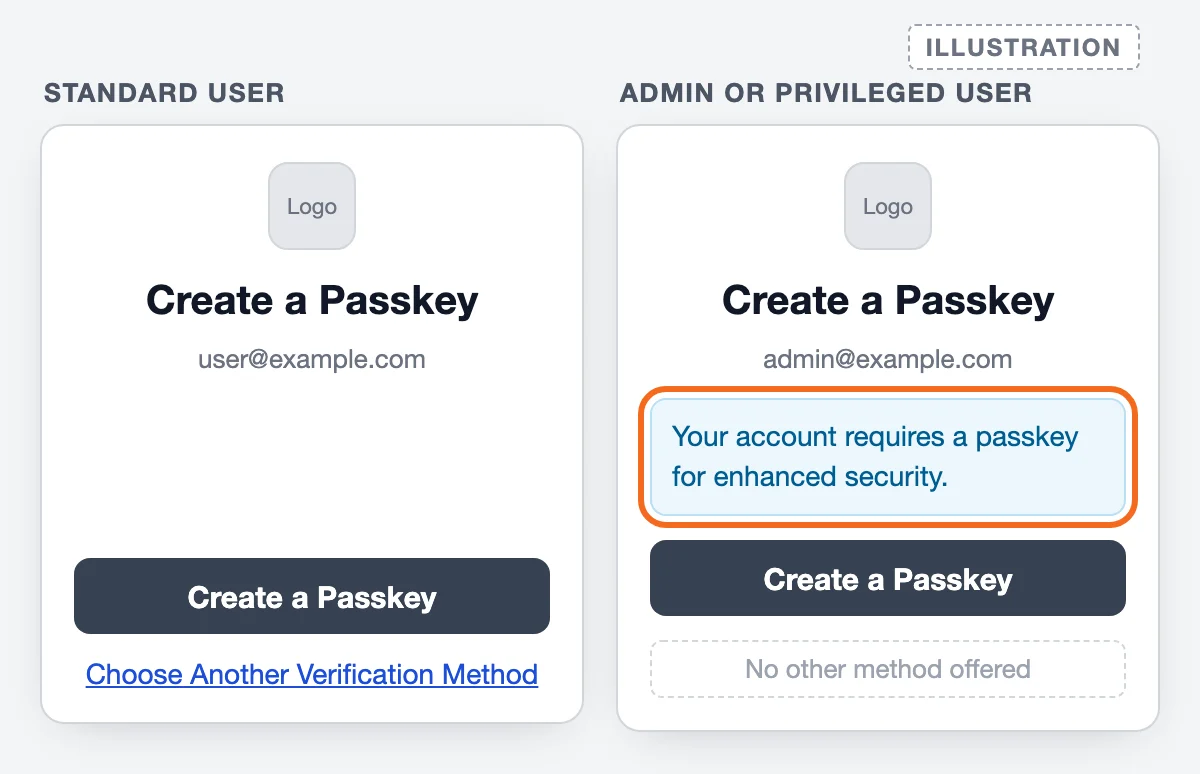
Since enforcement, Salesforce prompts every user without a registered method to create a passkey. A standard user can still click Choose Another Verification Method and set up Salesforce Authenticator or an authenticator app. A privileged user gets the passkey option only, and an SSO admin whose identity provider sent no phishing-resistant signal sees the line “Your account requires a passkey for enhanced security.” (Post-Enforcement Passkey Prompts and Extension Behavior, Salesforce, published 14 Oct 2026)
How to set up passkeys for your admins, step by step
- List every privileged user. Use a report, a list view, the User Access and Permissions Assistant or SOQL. Permission sets that belong to a profile appear in
PermissionSetAssignmenttoo, so one query catches both paths (run it in the Developer Console or any SOQL tool):
Users on the System Administrator profile come back through the profile's own permission set, which carries these permissions.SELECT Assignee.Username, Assignee.Name, PermissionSet.Name, PermissionSet.IsOwnedByProfile FROM PermissionSetAssignment WHERE Assignee.IsActive = true AND (PermissionSet.PermissionsModifyAllData = true OR PermissionSet.PermissionsViewAllData = true OR PermissionSet.PermissionsCustomizeApplication = true OR PermissionSet.PermissionsAuthorApex = true) ORDER BY Assignee.Username - Find anyone holding Waive Multi-Factor Authentication for Exempt Users. After enforcement it no longer exempts anyone. Keeping an exemption for a valid case, such as an automated test tool, takes Salesforce Support's approval (Prepare for Phishing-Resistant MFA Enforcement for Privileged Users including Admins, Salesforce, published 14 Oct 2026).
- Check the methods are switched on. In Setup, open Identity Verification. Salesforce turns on “Let users verify their identity with a built-in authenticator (passkey) such as Touch ID or Windows Hello” with enforcement, and you cannot turn it off once MFA is enforced (Enable Passkeys for Identity Verification, Salesforce, read 16 Oct 2026). Turn on the security key option too if anyone will use one. You cannot limit either method to admins only.
- Give at least two admins Manage Multi-Factor Authentication in User Interface. That permission is what lets an admin issue temporary codes and disconnect lost methods. With two holders, one lost phone or laptop cannot leave the org without anyone able to help (Resolve Passkey Login Issues in Salesforce, Salesforce, published 12 Oct 2026).
- Have each admin register two phishing-resistant methods. The Salesforce Admins blog recommends two per privileged user (Salesforce Admins blog, Salesforce, 22 Jun 2026, updated 6 Jul 2026). A passkey on the laptop plus a security key, or a synced passkey in a password manager, covers a lost device. To add one: personal settings, Passkeys, Add Passkey, Create Passkey.
- Fix SSO signals. If admins log in through SSO, have the identity provider send a phishing-resistant AMR or ACR value, or turn on Salesforce MFA for that SSO provider while the identity team works on it. Check the Authentication Method Reference and Authentication Context Class Reference columns in Login History, or run the SAML Assertion Validator.
- Test in a sandbox. Log out, open a private browser window and log back in as a sandbox admin with the same permissions as production. Salesforce should ask for the passkey or key and let you in.
- Move integration users off UI logins. The OAuth web server and user-agent flows go through the login page and are subject to MFA. Migrate them to the JWT bearer or client credentials flow (Resolve Passkey Login Issues in Salesforce, Salesforce, published 12 Oct 2026). Our Salesforce OAuth errors guide covers the errors you meet on the way.
Our own production deploys sign in with the client credentials flow, described in our Salesforce CI/CD with GitHub Actions guide. Salesforce lists that flow as unaffected by this requirement.
For businesses on Salesforce
No second Salesforce admin? Set one up before the next lockout.
Synced passkey, device passkey or security key?
All three pass. They differ in what happens when an admin changes devices (Resolve Passkey Login Issues in Salesforce, Salesforce, published 12 Oct 2026).
| Option | Works on another device? | What to watch |
|---|---|---|
| Synced passkey in a password manager | Yes, wherever the admin is signed in to the same password manager | Shared partner admin logins need every person on that password manager |
| Device-bound passkey | No, register one on each device | Each new device needs a temporary code for its first login |
| Physical security key | Yes, any device the key plugs into or taps | A lost key is a lost method; keep a second one registered |
| Phone passkey used by QR code | Yes, a desktop can scan the phone's QR code | Useful when the desktop itself cannot create a passkey |
Can you get an extension?
Salesforce describes two extensions in its post-enforcement article: a Phishing-Resistant MFA extension and an MFA for All extension. With the phishing-resistant extension in effect and the org-wide MFA setting on, privileged users drop to the standard MFA minimum and see Choose Another Verification Method again (Post-Enforcement Passkey Prompts and Extension Behavior, Salesforce, published 14 Oct 2026). Since a late-July patch, refreshed sandboxes inherit production's extensions. For privileged users with technical or organizational barriers, Salesforce's own direction is to contact Salesforce Support or your account representative (Prepare for Phishing-Resistant MFA Enforcement for Privileged Users including Admins, Salesforce, published 14 Oct 2026).
What if an admin is locked out by the passkey prompt?
Another admin with the Manage Multi-Factor Authentication in User Interface permission generates a temporary verification code from the locked admin's user record, valid for 1 to 24 hours. Salesforce counts that code as phishing-resistant for a direct login, so the admin logs in with username, password and code, then registers a passkey. If the locked-out person is the only admin, Salesforce's passkey article says to contact Salesforce Customer Support with the org ID and admin username; Support can disconnect the existing passkey (Resolve Passkey Login Issues in Salesforce, Salesforce, published 12 Oct 2026). The full escalation path, including what Support asks for, is in Locked out of Salesforce.
One more trap: a sandbox refresh disables SAML SSO in the sandbox and does not carry MFA methods over, so admins log in directly and register a new phishing-resistant method before they can reconfigure SSO (Prepare for Phishing-Resistant MFA Enforcement for Privileged Users including Admins, Salesforce, published 14 Oct 2026).
If your company has no second Salesforce admin
We are an independent Salesforce consultancy, separate from Salesforce Support. We cannot unlock a user, reset MFA or change an admin's email from outside your org; only an admin inside it, or Salesforce, can. What we do is the work that keeps a business from depending on one login: a second admin, a break-glass account, passkeys enrolled for everyone who needs them, and SSO and integrations that keep working through the next change. That is the admin work inside our Salesforce managed services.
Frequently asked questions
What is the Salesforce passkey requirement?
Salesforce requires phishing-resistant MFA for privileged users: anyone with the System Administrator profile or the Modify All Data, View All Data, Customize Application or Author Apex permission. It applies to direct and SSO logins in production and sandbox orgs. Enforcement started on 10 July 2026 in sandboxes and 20 July 2026 in production.
Does Salesforce Authenticator still work for admins?
No. Salesforce classes Salesforce Authenticator and TOTP apps such as Google or Microsoft Authenticator as standard MFA, which privileged users can no longer use. Users without those permissions can keep using them.
How do I set up a passkey in Salesforce?
From your personal settings, open Passkeys (or Advanced User Details, then Built-in Authenticators), click Add Passkey, verify your identity if asked, click Create Passkey and follow your device's or password manager's prompts. If you are already being blocked at login, the Create a Passkey screen takes you through the same registration.
Do Salesforce passkeys work on more than one device?
A device-bound passkey works only on the device that created it. For more than one device, store a synced passkey in a password manager, register a passkey on each device, use a physical security key, or sign in from a desktop by scanning a QR code with a phone that holds the passkey.
Does the passkey requirement affect API integrations?
Only integrations that sign in through the Salesforce login page. The OAuth web server and hybrid flows include a UI login, so they are subject to MFA. Salesforce says apps on the JWT bearer or client credentials flow are unaffected, because no UI login takes place.
Can we get an extension on phishing-resistant MFA?
Salesforce documents a Phishing-Resistant MFA extension that lowers privileged users to the standard MFA minimum while it is in effect. Its own guidance sends privileged users with technical or organizational barriers to Salesforce Support or their account representative.