
A small team deploys Salesforce changes with GitHub Actions, and the only record of what shipped is the Actions tab. Nobody knows which org a change reached, and a failed deploy stays quiet until someone asks. This guide makes every deploy post to a Discord channel when it starts and when it ends, with what changed and, on a failure, the step that broke.
The steps come from one build of our own release pipeline. The version below needs a webhook and two files, and step 5 covers the fuller version that build used.
What you need before you start
- A GitHub Actions workflow that deploys your org. If you have none yet, start with how to set up Salesforce CI/CD with GitHub Actions.
- A Discord server where you hold the Manage Webhooks permission, and a channel for deploys.
- Admin access to the repository, to add one secret.
Step 1: Know the shape of the pipeline
We recommend making each hop its own workflow, so each run reports one move. In one build, our pipeline had a work branch per change, a uat branch that matched the UAT sandbox, and main, which matched Production.
Work branch
A change is built
One branch per change, cut from main.
Test org
Send to UAT workflow
Runs on each push to a work branch: merges it into uat and deploys the changed files to the UAT sandbox.
Production
Ship to Production workflow
A person runs it for a branch already on uat. It releases the branch to Production and moves main.
Discord
One deploys channel
Each workflow posts when its deploy starts and when the run ends.
Signing in, deploying only the changed files and running tests are in the CI/CD guide. This guide adds only the notices.
Step 2: Create the webhook and post two messages
In Discord, open Server Settings, then Integrations, and click Create Webhook. Choose the deploys channel, name the webhook, and click Copy Webhook URL (Discord's guide). A webhook needs no other sign-in, so anyone holding the URL can post to the channel. Treat it like a password.
In GitHub, open the repository's Settings, then Secrets and variables, then Actions, and click New repository secret. Name it DISCORD_DEPLOY_WEBHOOK and paste the URL.
Commit this script to main as scripts/ci/notify-discord.sh. It builds one message, sends it, and never fails the run.
#!/usr/bin/env bash# Posts one deploy notice to Discord. It never fails the run.# Environment: DISCORD_WEBHOOK_URL, ORG_LABEL, PHASE (started or finished),# and for finished: STATUS (job.status) and STEPS_JSON (toJSON(steps)).# Set NOTIFY_DRY_RUN=1 to print the message instead of sending it.set -u phase="${PHASE:-started}"status="${STATUS:-success}"org="${ORG_LABEL:-Salesforce}"run_url="${GITHUB_SERVER_URL:-}/${GITHUB_REPOSITORY:-}/actions/runs/${GITHUB_RUN_ID:-}"sha="${GITHUB_SHA:-}"subject=$(git log -1 --format=%s "${sha:-HEAD}" 2>/dev/null) # One line per component: a class and its -meta.xml file count once,# and so do the files of one Lightning component.components=$(sed -E 's#^force-app/main/default/##; s#-meta\.xml$##' \ "${RUNNER_TEMP:-.}/changed.txt" 2>/dev/null \ | awk -F/ '$1 == "lwc" || $1 == "aura" { print $1 "/" $2; next } { print }' | sort -u)count=$(printf '%s' "$components" | grep -c .) if [ "$count" -eq 0 ] && [ "$status" != "failure" ]; then echo "No Salesforce files changed; nothing posted." exit 0fi case "$phase:$status" in started:*) echo "NOTIFY_STARTED_AT=$(date +%s)" >> "${GITHUB_ENV:-/dev/null}" title="Deploy to $org started" color=3447003 desc="Changed components: $count"$'\n'$(printf '%s\n' "$components" | head -n 30 | sed 's/^/- /') if [ "$count" -gt 30 ]; then desc="$desc"$'\n'"and $((count - 30)) more"; fi ;; finished:success) title="Deployed to $org" color=3066993 desc="Took $(( $(date +%s) - ${NOTIFY_STARTED_AT:-$(date +%s)} )) seconds" ;; finished:failure) steps_json="${STEPS_JSON:-}" [ -n "$steps_json" ] || steps_json='{}' step=$(printf '%s' "$steps_json" | jq -r 'to_entries[] | select(.value.outcome == "failure") | .key' 2>/dev/null | head -n 1) title="Deploy to $org failed${step:+ at $step}" color=15158332 desc="Open the run for the error." ;; *) echo "The run was $status; nothing posted." exit 0 ;;esac payload=$(jq -n --arg title "$title" --arg url "$run_url" --argjson color "$color" \ --arg desc "$desc" --arg org "$org" --arg branch "${GITHUB_REF_NAME:-}" \ --arg actor "${GITHUB_ACTOR:-}" --arg commit "${sha:0:7} $subject" \ '{allowed_mentions: {parse: []}, embeds: [{title: $title[0:256], url: $url, color: $color, description: $desc[0:4000], fields: [{name: "Org", value: $org, inline: true}, {name: "Branch", value: $branch, inline: true}, {name: "Run by", value: $actor, inline: true}, {name: "Commit", value: $commit[0:1000]}]}]}') || exit 0 if [ -n "${NOTIFY_DRY_RUN:-}" ]; then printf '%s\n' "$payload" exit 0fiif [ -z "${DISCORD_WEBHOOK_URL:-}" ]; then echo "No Discord webhook in this run; nothing posted." exit 0fi code=$(curl -sS -o /dev/null -w '%{http_code}' --max-time 20 \ -H 'Content-Type: application/json' --data "$payload" "$DISCORD_WEBHOOK_URL") || code=000case "$code" in 2*) echo "Posted to Discord." ;; *) echo "::warning::Discord answered $code; nothing was posted." ;;esacexit 0Then put two notice steps around your deploy. This complete workflow covers the hop to the test org. The sign-in step stands in for yours and fails on purpose until you replace it, so your first run also shows the failure message.
name: Deploy to UAT on: push: branches: - uat permissions: contents: read concurrency: group: deploy-uat cancel-in-progress: false jobs: deploy: runs-on: ubuntu-latest timeout-minutes: 30 env: ORG_LABEL: UAT sandbox DISCORD_WEBHOOK_URL: ${{ secrets.DISCORD_DEPLOY_WEBHOOK }} steps: - name: Check out uses: actions/checkout@v5 with: fetch-depth: 0 # brings main too, where the notice script lives - name: List the changed Salesforce files id: changes env: BEFORE_SHA: ${{ github.event.before }} run: | base="$BEFORE_SHA" git cat-file -e "$base^{commit}" 2>/dev/null || base="$GITHUB_SHA~1" git diff --name-only --diff-filter=AMR "$base" "$GITHUB_SHA" -- force-app > "$RUNNER_TEMP/changed.txt" echo "count=$(wc -l < "$RUNNER_TEMP/changed.txt" | tr -d ' ')" >> "$GITHUB_OUTPUT" - name: Tell Discord the deploy started continue-on-error: true timeout-minutes: 2 env: PHASE: started run: | git show origin/main:scripts/ci/notify-discord.sh > "$RUNNER_TEMP/notify.sh" || exit 0 bash "$RUNNER_TEMP/notify.sh" # Replace this step with the CLI install and sign-in steps from your # deploy workflow, and give each one an id. Until you do, it fails on # purpose, so your first run also shows the failure message. - name: Sign in to UAT id: sign_in run: | echo "::error::Add your Salesforce CLI install and sign-in steps here." exit 1 - name: Deploy the changed files id: deploy if: steps.changes.outputs.count != '0' run: | args=() while IFS= read -r path; do args+=(--source-dir "$path"); done < "$RUNNER_TEMP/changed.txt" sf project deploy start "${args[@]}" --target-org uat --wait 60 - name: Tell Discord how it ended if: always() continue-on-error: true timeout-minutes: 2 env: PHASE: finished STATUS: ${{ job.status }} STEPS_JSON: ${{ toJSON(steps) }} run: | git show origin/main:scripts/ci/notify-discord.sh > "$RUNNER_TEMP/notify.sh" || exit 0 bash "$RUNNER_TEMP/notify.sh"For Production, copy the file and change the branch, ORG_LABEL and the target org. The deploy flags are in the Salesforce CLI reference.
Step 3: Put the facts people ask for in the message
A notice earns its place when nobody has to open GitHub to answer the first question. Each fact comes from something the runner already has, listed in GitHub's variables reference.
| What the message says | Where it comes from |
|---|---|
| Which org | ORG_LABEL, set in each workflow |
| Branch | GITHUB_REF_NAME |
| Commit | GITHUB_SHA, cut to seven characters, and its subject from git log |
| Who ran it | GITHUB_ACTOR |
| Changed components | git diff --name-only from the push's before commit to GITHUB_SHA, inside force-app |
| Link to the run | GITHUB_SERVER_URL, GITHUB_REPOSITORY, /actions/runs/ and GITHUB_RUN_ID |
| Result | job.status: success, failure or cancelled |
| Failed step | The steps entry whose outcome is failure |
To name the failed step, give every sign-in and deploy step a short id such as sign_in, because the steps context holds only steps with an id. Leave the notice steps without one, so a failed notice is never reported as a failed deploy.
A commit subject is text anyone with push access wrote. The script passes it to jq as an argument, so it never becomes part of a shell command (GitHub's advice on untrusted input), and an empty parse list under allowed_mentions stops an @everyone in a commit from pinging the server.
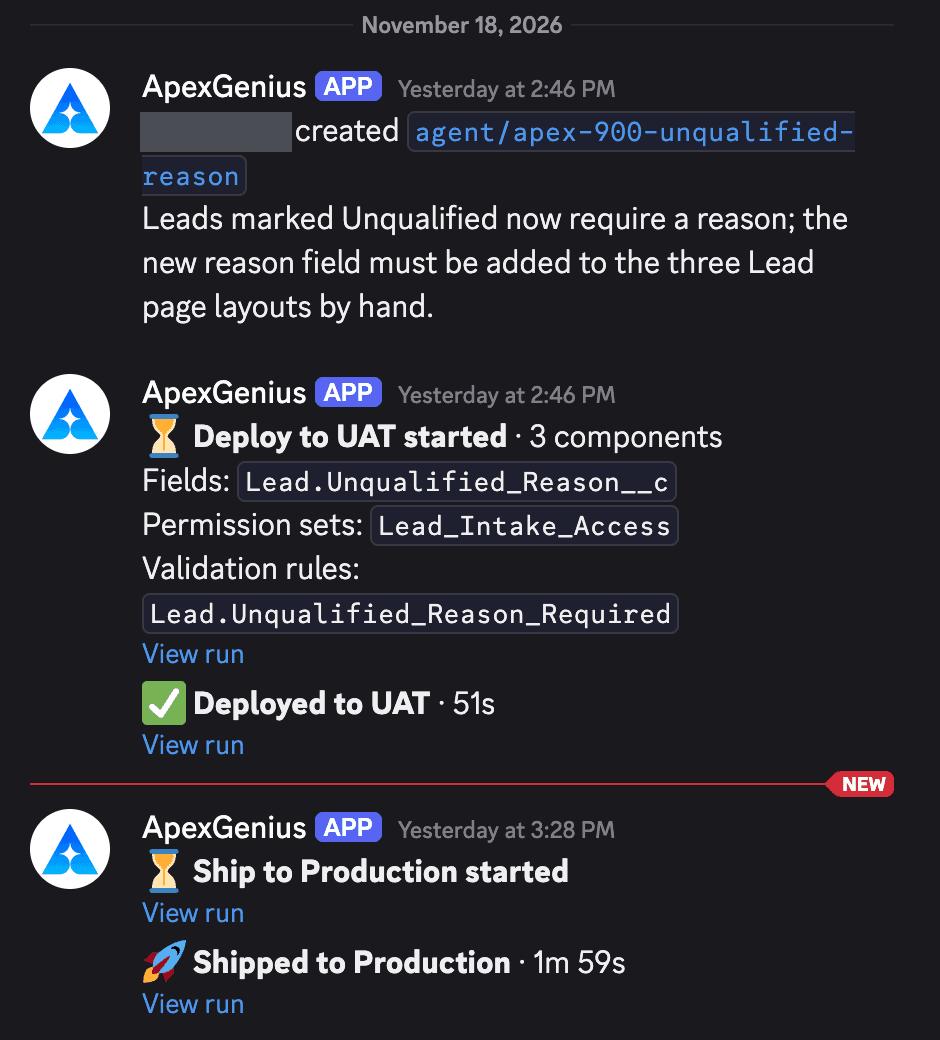
Step 4: Make sure a notice cannot break a deploy
Four settings keep a notice a side job, and the files above already have them.
continue-on-error: trueon both notice steps, which lets the job pass when that step fails (workflow syntax).timeout-minutes: 2, so a slow request cannot hold the deploy.- Exit 0 on every path. The script posts nothing without a secret and logs a warning when Discord refuses a message.
- Read the script from main with
git show, never from the checked-out branch.
The last one matters on the test-org hop. In one build, that workflow first merged the work branch into uat, and the merged tree could hold an older copy of the script. Reading it from main means every run posts with the current version. It is also why the checkout sets fetch-depth: 0: by default actions/checkout fetches one commit, and main would be missing.
The steps themselves live in each branch's workflow file. In that build, branches cut before the steps were added posted nothing until they took the change from the production branch.
Step 5: The fuller version with an OIDC token and your own API
The webhook version may be all you need. In one build, our pipeline went further: each run proved who it was with GitHub's OpenID Connect token and sent the facts to our own small API, which posted as a bot.
# In the workflow: the job may ask GitHub for a signed token,# and may read its own run to name a failed step.permissions: contents: read id-token: write actions: read # In the notice script: ask for a token made out to your API, then send.token=$(curl -sS --max-time 20 \ -H "Authorization: bearer $ACTIONS_ID_TOKEN_REQUEST_TOKEN" \ "$ACTIONS_ID_TOKEN_REQUEST_URL&audience=deploy-notices" | jq -r '.value') curl -sS --max-time 30 \ -H "Authorization: Bearer $token" \ -H 'Content-Type: application/json' \ --data "$payload" "$NOTICE_API_URL"id-token: write only lets the job request the token, and GitHub says it grants no other write access (OIDC reference). Your API should check the token's signature against GitHub's published keys, its issuer and audience, and that the repository and branch are ones it serves. actions: read lets the script read the run's jobs from GitHub's REST API, so the post names the failed step by its real name.
- No long-lived secret in the repository. The run asks GitHub for a signed token each time it posts (GitHub on OIDC).
- One place to format messages for every repository.
- Threads. A webhook can create threads only in forum or media channels. In that build, each branch got one line naming who created it and what it did, and every later post was a reply under it.
- A retried request posts once if the API remembers each run and phase it has posted.
The cost is a service and a bot you now run, so start with the webhook.
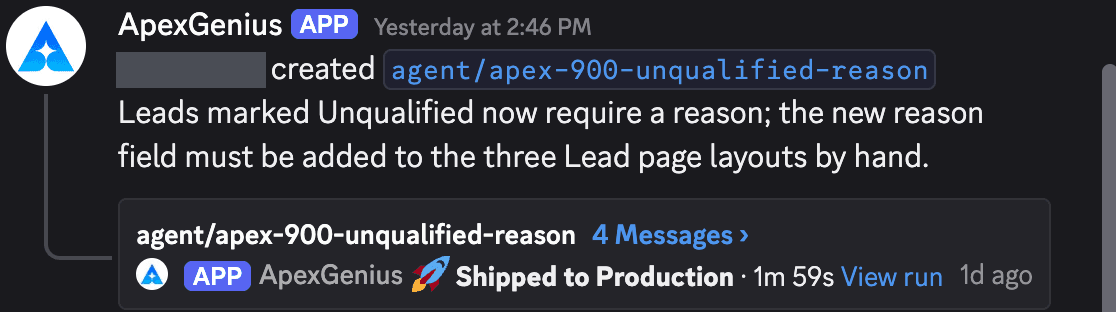
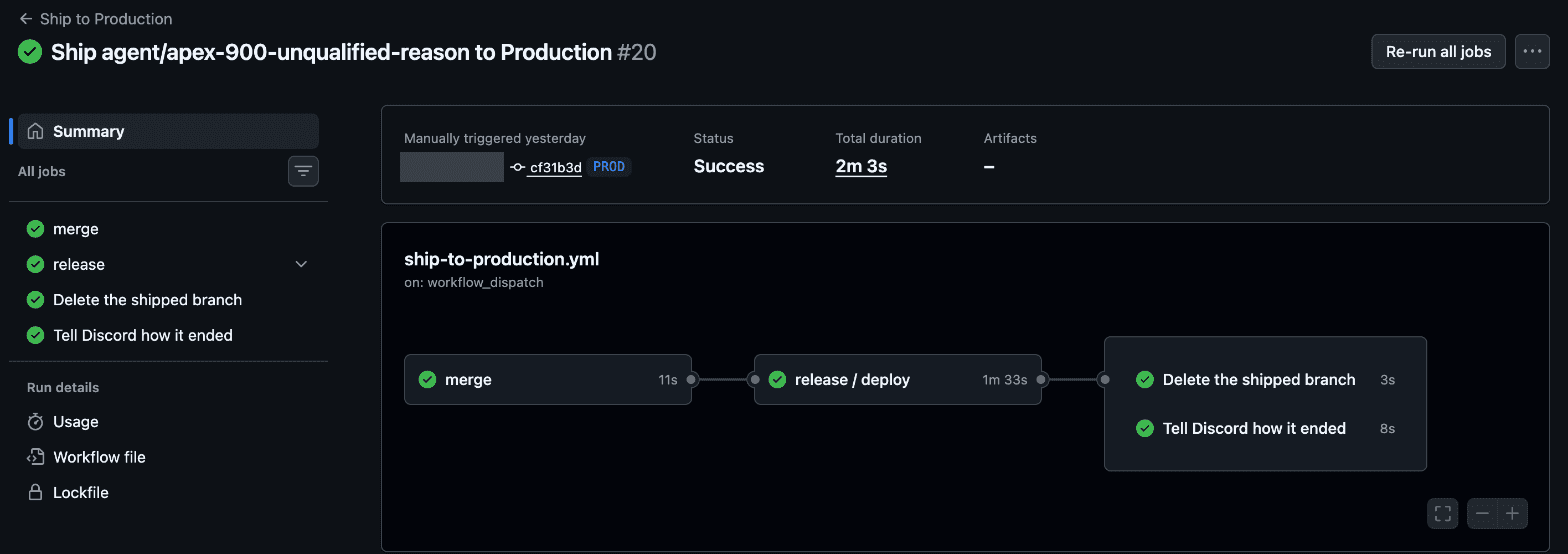
Step 6: Keep the channel worth reading
Use one channel for deploys, open to the people who work on the org. We recommend keeping Salesforce deploys apart from application releases. Leave out secret values and full error text (the run log has the error), runs that change no Salesforce files, cancelled runs, and pings on success.
Failures stand out by colour and wording: blue for started, green for deployed, red for failed, with the step in the red title. To ping the person whose run failed, map their GitHub login to a Discord user id, write <@id> in the content, and list only that id under users in allowed mentions.
Step 7: Test both endings before you rely on it
Push a small change to uat with the stand-in sign-in step still there. Expect a blue started message listing the component, then a red one saying the deploy failed at sign_in. Replace the stand-in, push again, and look for green. Set NOTIFY_DRY_RUN: 1 on a notice step to print the JSON in the run log instead of sending it.
Every setting on one page
| Setting | Where it lives | Value in this guide |
|---|---|---|
| Webhook | Discord, Server Settings, Integrations | One, posting to the deploys channel |
DISCORD_DEPLOY_WEBHOOK | Repository Settings, Secrets and variables, Actions | The webhook URL |
ORG_LABEL | Job env in each workflow | UAT sandbox, or Production |
| Step ids | Every sign-in and deploy step | Short names such as sign_in |
continue-on-error | Both notice steps | true |
timeout-minutes | Both notice steps | 2 |
if | The last notice step | always() |
allowed_mentions | The message body | Empty parse list |
id-token, actions | permissions, fuller version only | write, read |
When a notice does not arrive
| What you see | Likely cause | What to check |
|---|---|---|
| A started message, never a finished one | The last step has no if: always(), so GitHub's default success() skipped it after the failure | The step's if (status check functions) |
| Nothing from a pull request opened from a fork | Secrets are not passed to runs triggered from a fork | The log line about no webhook (using secrets) |
| A 4xx warning after a large change | Over a limit: 2,000 characters of content, 4,096 in a description, or 6,000 across all embeds | The list length (embed limits) |
| A 429 warning | Rate limited. retry_after in the reply says how many seconds to wait, and Discord says not to hard-code its limits | One post per phase (rate limits) |
| A 404 warning | The webhook was deleted, and Discord says to stop using it | A new webhook and secret |
| A failure with no step name | The failed step has no id | Ids on sign-in and deploy steps |
GitHub recommends if: ${{ !cancelled() }} over always(), and warns that a run using always() on a task that fails badly may hang until it times out. With a two-minute limit, either works here.
Before the whole team relies on it
- Who can read the channel? Component names and commit subjects describe changes to your org.
- Who gets pinged? The person whose run failed, and nobody on a success.
- Who owns the webhook? Anyone who can manage webhooks in the server can delete it, and the notices stop.
Frequently asked questions
Can a Discord notification fail a Salesforce deploy?
Not with the settings in this guide. Both notice steps set continue-on-error to true, which lets the job pass when that step fails, and each has a two-minute timeout. The script exits 0 on every path.
How do I show which GitHub Actions step failed?
Give each sign-in and deploy step an id and pass toJSON(steps) to the last step. The steps context lists every step with an id that has already run, with its outcome, so the failed step is the one whose outcome is failure.
Do I need a Discord bot to post deploy notifications?
No. A webhook posts with no bot and no other sign-in. A thread per branch in an ordinary channel needs a bot or your own service, because a webhook can create threads only in forum or media channels.
How long can a Discord deploy message be?
Up to 2,000 characters of content. Embeds allow 4,096 characters in a description, 25 fields, and 6,000 characters across all the embeds on one message.
Official references
- Discord Help Center: Intro to Webhooks
- Discord Developer Docs: Webhook resource, Execute Webhook
- Discord Developer Docs: Message resource, embed limits and allowed mentions
- Discord Developer Docs: rate limits
- GitHub Docs: using secrets in GitHub Actions
- GitHub Docs: expressions and status check functions
- GitHub Docs: contexts reference
- GitHub Docs: workflow syntax
- GitHub Docs: variables reference
- GitHub Docs: events that trigger workflows
- GitHub Docs: secure use reference
- GitHub Docs: OpenID Connect
- GitHub Docs: OpenID Connect reference
- GitHub Docs: REST API endpoints for workflow jobs
- GitHub: actions/checkout
- Salesforce CLI reference: project deploy start
GAT Solutions is an independent Salesforce consultancy. Salesforce, GitHub and Discord are trademarks of their respective owners.