
Most "AI for Salesforce admins" content is really "AI that describes Salesforce." Ask a chatbot about permission sets and it will explain what a permission set is. That is not admin work. Admin work is auditing which of your 40 permission sets still grant Modify All Data, building the report a director asked for before the Friday call, and adjusting an Omni-Channel routing configuration without dropping cases on the floor. This article is about doing those tasks with Claude, for real, in real orgs, and about the guardrails that make it defensible.
Disclosure up front: the gateway in these examples is ApexGenius, our own Salesforce MCP product. We built it because we needed it in our consulting practice, and the numbers below come from operating it, not from a demo org. The architecture lessons apply to any Salesforce MCP connection.
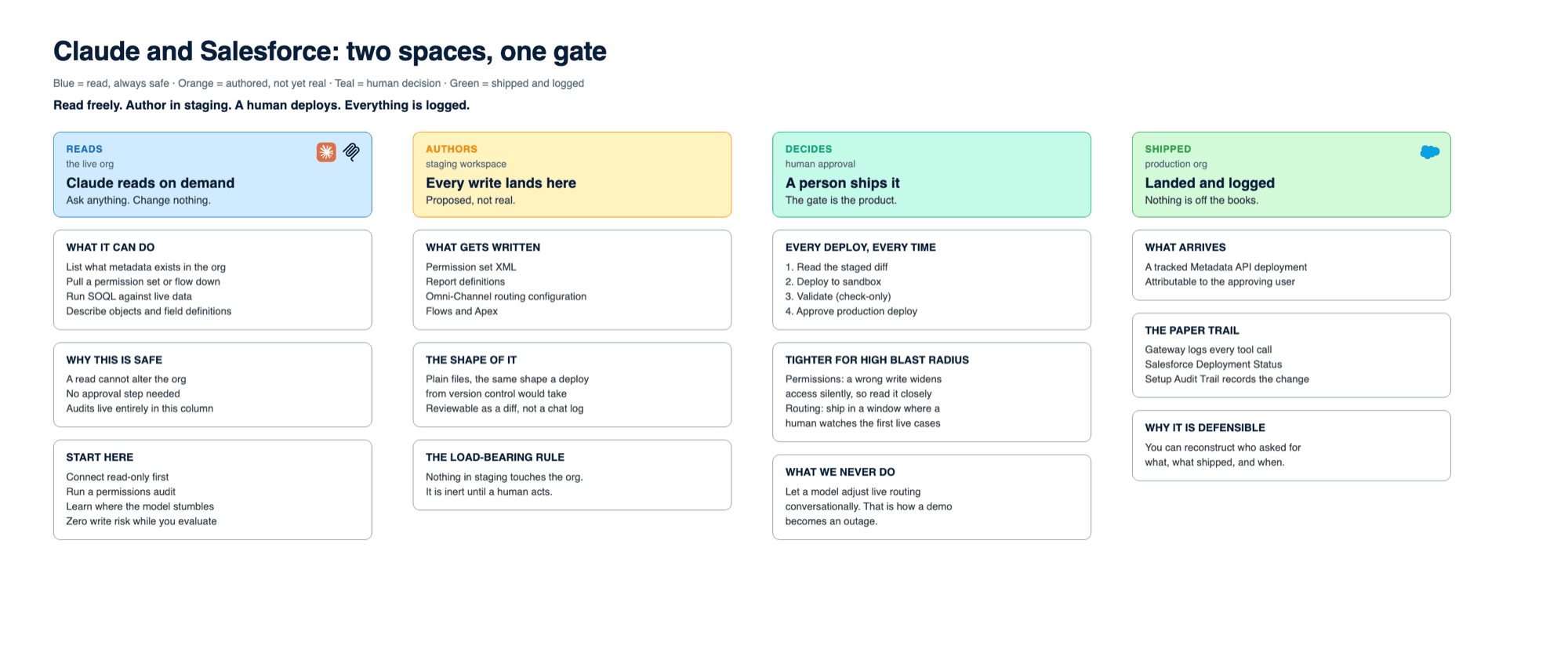
The rule that makes all of this work: Claude proposes, a human approves, and nothing reaches the org without a deliberate deploy step. AI speed with admin accountability, never one without the other.
The setup: Claude, an MCP gateway, and two distinct spaces
The connection is Model Context Protocol: Claude calls typed tools that an MCP server exposes over an authenticated Salesforce connection. What makes admin work (as opposed to Q&A) possible is how the gateway is shaped. ApexGenius works like a filesystem over the org, with two distinct spaces:
- The live org, which Claude can read on demand: list what metadata exists, pull a permission set or a flow down for inspection, run SOQL, describe objects.
- A staging workspace, where all authoring happens. Claude writes and edits metadata files here (permission sets, report definitions, routing configurations), and nothing in staging touches the org until a human triggers a deploy through the Metadata API.
That separation is the load-bearing wall. Reads are cheap and safe, so Claude gets them freely. Writes are consequential, so they accumulate in staging as reviewable files (the same shape a deployment from version control would take) and ship only when the consultant says ship. If you are evaluating this pattern for your own org, the Claude + Salesforce solution page walks through the connection options in more depth.
Task 1: Auditing and updating permission sets
Permission audits are the clearest case for this workflow, because the manual version is miserable: clicking through Setup, object by object, permission set by permission set, building a spreadsheet nobody maintains. With metadata access, Claude does the sweep in minutes: pull every permission set, cross-reference object and field permissions, and answer the questions that matter: Who can delete Opportunities? Which sets still grant access to fields the org retired two releases ago? Where do a profile and a permission set grant overlapping rights, and which one is actually doing the work?
On one enterprise engagement, that meant mapping roughly 5,200 metadata files (including 216 flows) to build the dependency picture a permissions decision actually requires. No admin reads 5,200 files. Claude reads all of them and surfaces the dozen that matter.
Updates follow the same discipline. When the audit says a permission set should lose a field permission or a new integration user needs a narrowly scoped set, Claude authors the XML in staging. The consultant reads the diff, and with permission sets we mean actually reads it, because a wrong write here widens access silently rather than throwing an error. Then it deploys to a sandbox first, gets validated, and ships to production as a tracked deployment. The result is a permissions change with a paper trail, not a Setup click nobody can reconstruct later.
Task 2: Building reports that match how the org actually works
Report requests are where admins lose their week an hour at a time. The interesting part of the job was never dragging fields onto a canvas. It is knowing that "pipeline by region" in this org means the custom Territory field, not the standard one, and that half-dead record types will pollute the numbers unless they are filtered out.
This is where the metadata context earns its keep. Because Claude can describe objects, read field definitions, and inspect existing reports before authoring a new one, it builds against the org's real schema instead of a generic idea of Salesforce. The workflow: describe what you need in plain language, let Claude inspect the relevant objects and propose the report definition (type, columns, filters, groupings) as metadata in staging, review it, deploy it. A report that used to be twenty minutes of canvas work becomes two minutes of review. Multiply by the backlog every admin carries and the arithmetic gets serious.
Reports are also the right place to build trust in the workflow, because the blast radius is small: a wrong report shows wrong numbers to someone who will notice, rather than silently changing who can see what. We start most engagements here for exactly that reason.
Task 3: Omni-Channel routing and case management rules
Routing is the highest-stakes of the three, because routing configuration is live operational plumbing. Queues, routing configurations, presence statuses, skills, assignment and escalation rules: misconfigure them and cases stall in a queue no one watches.
The audit half is genuinely hard to do by hand, because routing logic in a mature org is smeared across components: an assignment rule here, a flow there, an Omni-Channel routing configuration with weights nobody remembers choosing. Claude's advantage is holding all of it in view at once. Pull the queues, the routing configurations, the assignment rules, and the flows that touch Case, and ask: where do these disagree? Which queue has no active members? Which escalation rule fires after the SLA it was meant to protect?
For changes, the guardrails tighten further. Routing changes author in staging like everything else, but they validate in a sandbox against test cases before production, and they ship in a window where a human watches the first live cases route. The same review-then-deploy loop, with the paranoia dialed to match the blast radius. What we never do is let a model adjust live routing weights conversationally: that is how a clever demo becomes an outage.
| Reports | Permission sets | Omni-Channel routing | |
|---|---|---|---|
| Blast radius | Low. Wrong numbers get noticed. | High. A wrong write widens access silently. | Highest. Cases stall in a queue nobody watches. |
| How it fails | A field the schema retired, or an unfiltered record type. | A grant broader than the request, throwing no error. | Rules that disagree, or a queue with no active members. |
| Guardrail | Review the staged definition, then deploy. | Read the diff closely, validate in a sandbox first. | Sandbox against test cases, then ship in a watched window. |
| Adopt it | First. Value with a small blast radius. | Second, once you trust the review loop. | Last, with sandbox validation in the loop. |
The guardrails, stated as architecture
Every one of the tasks above runs inside the same operating loop, and the loop is the product:
- Human approval on every write. Claude never deploys on its own judgment. Staged files are reviewed as diffs, and the deploy call is a human decision, every time.
- Staging versus deploy. Authoring is separated from shipping by design, so "the AI edited a permission set" always means "there is a file to read before anything happens."
- Sandbox before production for anything that changes access or routing behavior, with validation and check-only deploys doing what they have always done. This workflow strengthens existing change management rather than bypassing it.
- Audit logging at the gateway. Every tool call is metered and attributable through ApexGenius, on top of Salesforce's own Deployment Status and Setup Audit Trail. Nothing the AI does is off the books.
Those controls are not theoretical: they are how ApexGenius, the Salesforce admin MCP, runs against live orgs every day, grounded on the org's own metadata and documentation.
Honest limits
A workflow article without limits is an advertisement, so here are ours. Claude occasionally proposes metadata that is plausible but wrong for the org (a report referencing a field the schema retired, a permission grant broader than the request), which is precisely why review is structural rather than optional. Long metadata sweeps can exceed a conversation's working context, so big audits run in planned passes, not one heroic prompt. Some configuration still is not cleanly reachable through the Metadata API, and those tasks remain Setup-screen work. And the human-approval loop means throughput is bounded by reviewer attention, which is the point, but it means this makes a good admin faster; it does not replace the judgment that makes them good. In healthcare orgs we operate to HIPAA-compliant standards by default, and ApexGenius is working toward HIPAA compliance, which is exactly the kind of claim we think vendors should make precisely or not at all.
Where to start
The sequence that works: connect read-only and run an audit first (permissions, reports, routing), because audits produce value with zero write risk while you learn where the model stumbles. Then enable staged writes for low-blast-radius work like reports. Only then extend to permissions and routing, with sandbox validation in the loop. That is the shape of our AI setup service: we stand up the connection, the guardrails, and the operating loop, then hand you a workflow your team runs, not a demo that decays. The orgs that get durable value from AI are the ones that made approval and audit part of the architecture on day one.
Frequently asked questions
Can Claude actually change Salesforce configuration, or just talk about it?
With an MCP gateway that speaks the Metadata API, Claude can author and ship real configuration: permission sets, report definitions, routing configurations, flows. The critical design choice is that authoring and shipping are separate steps. Claude writes metadata into a staging workspace; a human reviews the exact files; only then does a deploy call push anything to the org. Without that separation, you don't have an admin workflow. You have an unsupervised admin.
Is it safe to let an AI touch permission sets?
Only with structural guardrails, not promises. In our operating model the AI's edits land in staging first, every deploy is a human-approved action, every call is logged, and permission changes are validated against a sandbox before production. Permissions are the one metadata type where a wrong write widens access silently, so they get the strictest review of anything we ship this way.
Do I still need a Salesforce admin if Claude can do admin tasks?
Yes. The admin's judgment is the product; Claude changes the unit of work. Instead of clicking through Setup screens, the admin reviews diffs, approves deploys, and handles the calls that require org context the AI doesn't have: political ownership of a queue, why a legacy profile still exists, which team actually triages that case type. The mechanical assembly gets faster; the accountability stays human.
What's the difference between this and Agentforce?
Agentforce is Salesforce's platform for building agents that act inside Salesforce, usually facing end users. The pattern in this article points the other direction: a consultant or admin using Claude as a working tool against the org's metadata and data, through an MCP connection. They solve different problems and can coexist. If you're weighing the options, our comparison of Salesforce MCP paths covers the trade-offs.
How do you keep an audit trail of what the AI did?
Two layers. The gateway meters and logs every tool call, each attributable to a user and an org. Salesforce adds its own layer: deploys land in Deployment Status and the Setup Audit Trail records the resulting changes under the authenticated user's identity. Between the two you can reconstruct who asked for what, what shipped, and when.
Put Claude to work in your org, with the guardrails on
GAT Solutions builds revenue-generating systems for healthcare, accounting, and SaaS companies: fast, flawlessly, and powered by AI. If your admin backlog is measured in weeks, bring it to a working session: we will map which tasks belong in this workflow, show you the staging-and-approval loop live, and leave you with an architecture, not a chat window.