 GAT SolutionsBook a call
Menu
Salesforce
AI
How to Connect Muse to Salesforce
Connect Muse to Salesforce through ApexGenius in five steps: the setup prompt, the connector card, what Muse can read and change, and what it costs.
 MuseYour team asks in plain words
 ApexGeniusThe MCP gateway we built and run
 SalesforceAnswers with the connected user's permissions
Can Muse connect to Salesforce?
Yes. Muse reaches Salesforce through ApexGenius. You connect your org through Salesforce's own sign-in, paste one setup prompt in Muse, and approve the access. We build and run ApexGenius, so weigh our view with that in mind.
- No config fileMuse adds ApexGenius from inside a chat. There is no terminal step.
- Your accessSalesforce applies the permissions of the user who connects. Nothing is added to them.
- Your callYou approve Read only, Full access or Custom before Muse can use it.
How to connect Muse to Salesforce
Five steps with ApexGenius. Connect Salesforce first, then add ApexGenius in Muse.
Create your ApexGenius account
Open apexgenius.ai/signup and continue with Google or your email.
Create your accountGoogleEmailStart freeConnect Salesforce
On Start, pick Salesforce, choose Production or Sandbox, then click Connect Salesforce. Salesforce opens its own sign-in page. Sign in there and click Allow.
Salesforce applies the permissions of the user who connects. ApexGenius cannot give access that user does not already have.
SalesforceProductionSandboxConnect SalesforceAdd ApexGenius in Muse
On Start in ApexGenius, pick Muse and copy the Muse setup prompt. In Muse, ask it to connect ApexGenius and paste the prompt. Muse shows an ApexGenius connector card. Choose Connect.
The prompt is long because Muse asks for the sign-in addresses up front. No client ID or secret is needed.
ApexGeniusCustom connectorConnectApprove the access
ApexGenius opens its approval page. Choose Read only, Full access or Custom, then approve.
Approve accessRead onlyFull accessCustomApproveAsk a first question
Ask Muse which apps are connected. It lists them through ApexGenius, and Salesforce should be there. Then ask which active Flows touch Opportunity.
Which active Flows touch Opportunity?ApexGenius read from Salesforce
Screens are drawn for illustration. Muse publishes no setup page of its own, so these are the steps ApexGenius ships for it, checked on 12 November 2026.
The same connection, shown in ChatGPT and Claude
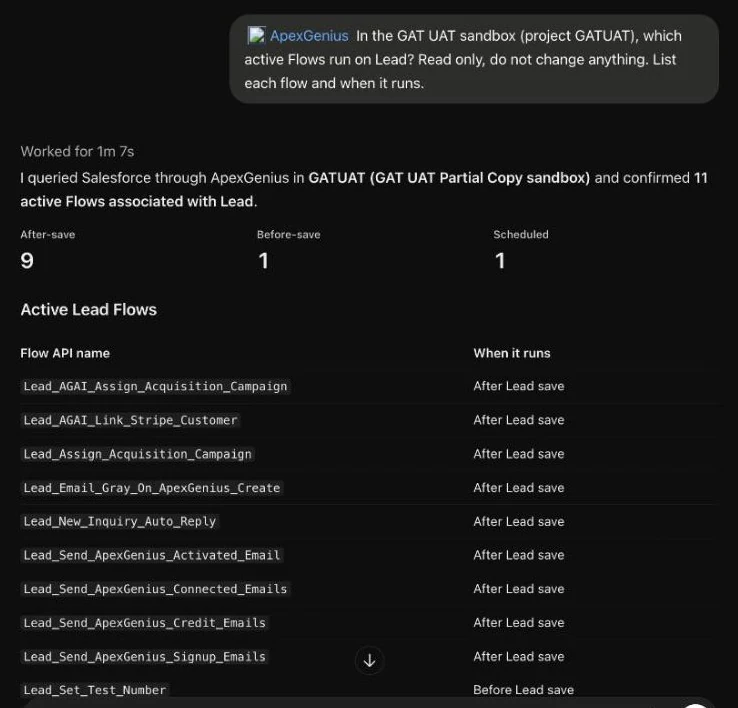
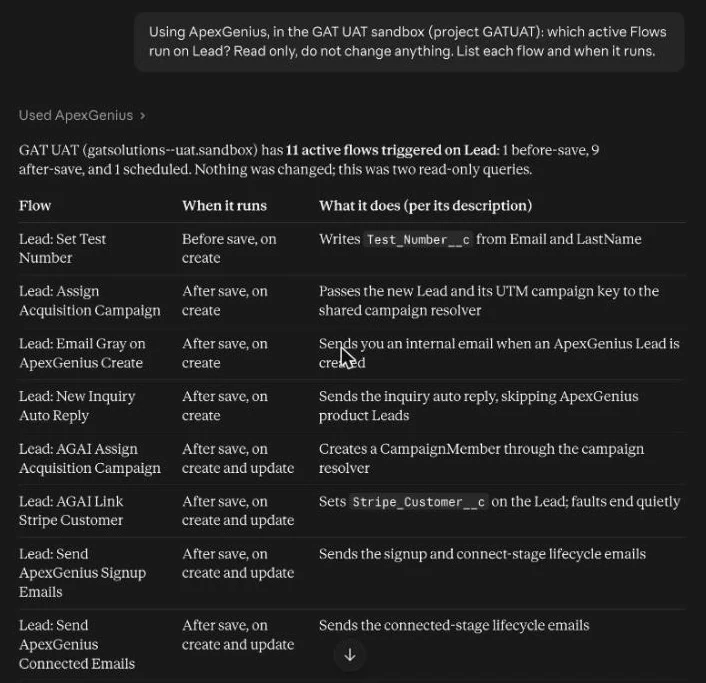
We have not captured Muse yet. These are real answers from 20 November 2026 in ChatGPT and in Claude, through the same ApexGenius connection to our own UAT sandbox, read only.
What Muse can do in Salesforce
It works with the records and with the way the org is built. You decide how far it goes when you approve Read only, Full access or Custom.
Ask about your records
Reads- Counts, lists and totals answered with a live query
- Search by name, email or phrase across objects
- Open one record or a batch of them
- List and read the files attached to a record
“How many Leads are in each Status?”
Understand how the org is built
Reads- List every object, standard and custom
- Describe an object: fields, relationships and picklist values
- List Apex classes, triggers, Flows and Lightning components
- Read and search the source behind them
“Which active Flows run on Lead?”
Change records
Writes- Create, update and upsert records, one or many
- Delete to the Recycle Bin. There is no hard delete.
- Bulk jobs for large sets, checked until they finish
“Move these five Leads to Attempting Contact.”
Build and deploy
Writes- Write Apex, Lightning components, Flows, fields, validation rules and permission sets
- Validate a deploy without deploying
- Run the tests you name, then deploy
“Add a validation rule so Closed Lost needs a reason, and validate it in the sandbox.”
Writes need Full access or a Custom approval. There is no tool for running reports or dashboards.
What it costs
Three separate bills. None of them includes the others.
ApexGenius- No card and no time limit to begin
- Salesforce calls are never charged
- Current plans on apexgenius.ai
Salesforce- ApexGenius signs in as a Salesforce user you already have
- Salesforce plans to meter production agent calls. The rate was still unannounced on 19 November 2026.
- Salesforce MCP cost, in full
Muse- Your Muse plan is separate from both
- If Muse shows the connector card again, choose Connect and finish the sign-in
Decide what Muse may see before you connect
Muse sees what the connected user can see. So we design the connected user first.
- Its own permission setScoped objects and fields for AI access, with no modify-all.
- Sandbox firstField security and sharing limits tested on purpose before production.
- A named ownerWho is connected, what can be asked, and who reads the log.
- Minimum necessaryFor health and financial data, scope agreed with your compliance team.
Salesforce MCP security: field security, sharing rules and PHI →
Jobs worth starting with, by team
Start with reads. Add writes where the job needs them.
- TelehealthNo-show follow-up: patients who booked and did not show this week, each with an owner and the next step.
- Behavioral healthAdmissions check: inquiries stuck before the benefits check, with how long each one has waited.
- Revenue teamsPipeline check before the forecast call: stale stages, missing amounts and dead deals, each with a fix proposed.
- B2B SaaSAccounts going quiet: usage down and a renewal coming, with the last touch and who owns it.
- Nonprofit programsEnrollment check: families registered this term with no cohort or an unpaid fee.
- Legal intakeLeads with no consult booked after the first call, sorted by case type and source.
- Support and careCase summaries: long threads cut down to the context and the next action.
- AdminsData quality triage: duplicates and broken handoffs found, with merges and fixes proposed.
- DevelopersApex and Flow debugging: errors explained against your own code and metadata.
Questions
Can Muse connect to Salesforce without Agentforce?
Yes. Muse connects through ApexGenius, which signs in to Salesforce as one of your users. It does not need an Agentforce license.
How do I check that Muse can use Salesforce?
Ask Muse which apps are connected through ApexGenius. It lists them, and Salesforce should be there. If Muse shows the ApexGenius connector card again, choose Connect and finish the browser sign-in.
Can Muse write to Salesforce, or only read?
Both. You approve Read only, Full access or Custom when you connect. We start with reads and add writes where the job needs them.
Does it also work with ChatGPT and Claude?
Yes. The Salesforce connection is the same, and each assistant needs its own setup. Our ChatGPT and Claude pages cover those.
Book a call, or tell us what Muse should do in Salesforce.
Prefer to talk it through?
Pick a 30-minute time with Gray. Bring the job you want Muse to do.