 GAT SolutionsBook a call
Menu
Salesforce
AI
Salesforce Consulting for Nonprofits
Salesforce consulting for nonprofits that run programs: registration, cohorts and attendance, gifts and grants, clean data loads and reports funders ask for.
What we build for nonprofits that run programs
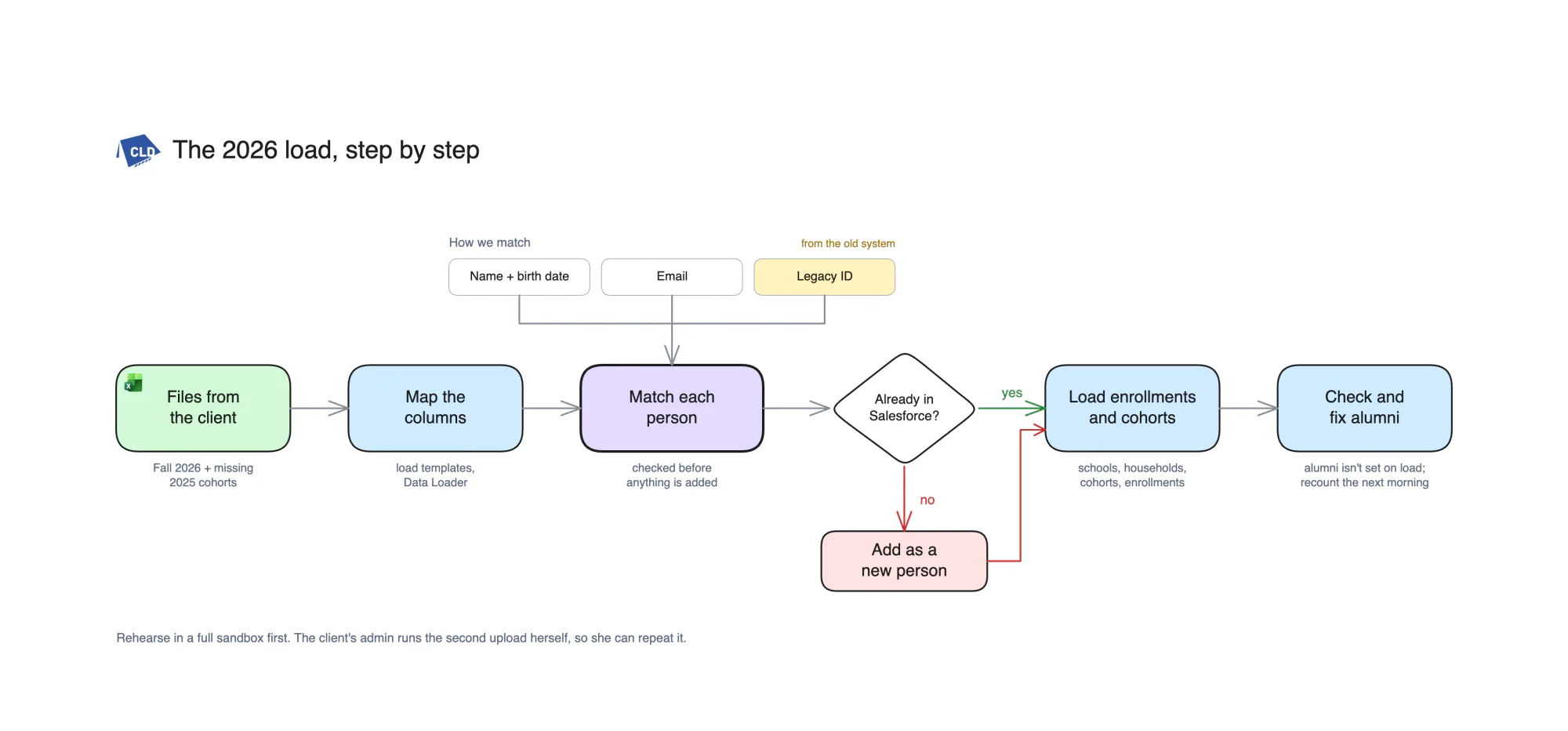
We build the program side of Salesforce the way a nonprofit runs it: a registration portal where a family finds itself before it registers, households, schools, cohorts and enrollments by term, attendance and alumni status, and the gifts, fees, sponsors and grants that pay for it all. Then the outcome reports funders ask for, on totals that recount every night. If your org already exists, we start by drawing how it works, then load the program data kept in spreadsheets without adding anyone twice. The diagrams further down come from that work for Center for Leadership Development, a youth leadership nonprofit on Nonprofit Cloud.
- MappedHow the org works, drawn from the org itself in pictures staff can follow.
- MatchedEvery person in a program load matched to a record already there before anything is added.
- Handed overA checklist, a template sheet and the steps written down, so your admin runs the next load.
What we build for nonprofit teams
Real systems, grouped by how a program nonprofit works: enroll families, deliver the program, fund it, then run it and report on it. Each one ships on its own and connects to the rest.
Enroll families
From the program link, or last year's spreadsheet, to a family in a cohort, with each person in Salesforce once.
- Register for the spring programFind yourselfFamilyCohortFeeFamilyFound on fileSupportive adultOptionalFeeDue at the end
Program registration portal
A parent registers a student from the program link, finds the family already on file, and the enrollment, cohort spot and fee reach Salesforce without staff retyping a form.
- Find yourself first, so no family is added twice
- One form for the student, each parent or guardian and any supportive adult
- Enrollment and cohort created together, with the fee paid online when one is due
Experience CloudFlowProgram ManagementGoFundMe Pro - StudentLinked, two adultsLinked, with districtParent or guardianLives with studentSupportive adultEnrolled alongsideProgramsOne completed, one current
Households, parents and schools
Staff open one student and see the household, each parent or guardian, the school and district, and every program the family has been part of.
- Households built or reused at registration, never duplicated
- Parent, guardian and supportive adult roles on each relationship
- Schools and districts as accounts, with grade and graduation year kept on the student
Nonprofit CloudPerson AccountsFlow - Leadership programFallSpringSummerNew cohortGrades 9 to 10Accepting registrationsGrades 11 to 12Accepting registrationsMiddle schoolClosed
Cohorts and enrollments by term
Each term opens with its own cohorts, and staff switch registration on or off per cohort instead of editing the form.
- Programs with eligible grades, location and fee rules
- A cohort per term, with registration switched on or off
- Student and supportive adult enrollments linked to each other
Program ManagementFlowReports - Matching peopleMap columnsMatchLoadCheckName and birth dateMatchedEmailMatchedLook-alikeHeld for staffNo matchAdd as new
Program data loads from spreadsheets
A term of sign-ups and sessions kept in spreadsheets lands on the people already in Salesforce, instead of creating a second copy of every family.
- Each person matched by name and birth date, email or legacy id before anything is added
- A new person added only when nothing matches, with look-alikes held for staff to decide
- Rehearsed in a full sandbox, then run in Production and checked against reports
Data LoaderFull sandboxProgram ManagementIn productionRun for Center for Leadership Development: every person matched before anything was added, rehearsed in a full sandbox before Production.
Deliver the program
What happens between the first session and the last, recorded where the reports can find it.
- Public speaking sessionSave attendanceStudent APresentStudent BAbsent, excusedStudent CPresentStudent DNot marked
Attendance, services and sessions
Facilitators mark who came to each session, and the services each student received build up on the enrollment instead of on a paper sign-in sheet.
- Services and sessions set up once for each program
- Attendance marked per session, with the reason for an absence
- Orientation and prerequisites tracked before the first session
Program ManagementFlowSalesforce mobile app - Volunteer application: tutoringApplicationReceivedBackground checkIn progressYouth clearanceWaiting on checkCode of conductSigned
Volunteer applications and clearance
A volunteer applies once online, and staff see the background check, youth clearance and code of conduct before anyone is placed with students.
- An online application with tutoring and facilitator interests
- Background check, youth-interaction clearance and code of conduct tracked with dates
- Only cleared volunteers offered for sessions
Experience CloudFlowNonprofit Cloud - Enrollment: completedRegisteredEnrolledCompletedAlumProgram grants alumniYesAlumni statusSetNextScholarship invitation
Alumni status and tracking
A student who completes a program that grants it becomes an alum on the record, and staff can find alumni for the next program, a scholarship or an event.
- Alumni status set when the enrollment is completed
- Status checked after every data load, since loads can skip the automation
- Alumni lists for next programs, scholarships and invitations
FlowProgram ManagementReports
Fund it
Gifts, fees, sponsors and grants on the same records as the programs they pay for.
- DonorRolled up last nightLast giftPaid, to programsPledgeNext payment dueSoft creditFrom a board memberThank-youSent
Donor and gift management
Every gift, pledge and soft credit sits on the donor's record, so the thank-you, the receipt and next year's ask come from one place.
- Gifts, pledges and recurring gifts, each with a designation
- Soft credits and tributes for honor and memorial gifts
- Anonymous donors kept anonymous in every report
FundraisingNonprofit CloudAccount Engagement - Registration feeGoFundMe ProPayment receivedGiftCreated in SalesforceEnrollmentLinked to the student
 Fee marked paid on the enrollment
Online giving and fees from GoFundMe Pro
Donations and registration fees paid on GoFundMe Pro arrive in Salesforce as gifts, and a paid fee marks the student's enrollment paid.
- Gifts and donors synced from each GoFundMe Pro campaign
- Each registration fee linked to the student's enrollment
- Fees that arrive without a match listed for staff to link
GoFundMe ProFundraisingFlow - SponsorsGalaGolf classicCollege fairPresenting sponsorCommittedTable sponsorPaidLast year's sponsorNot asked yet
Event sponsorships
The gala, golf classic and college fair each keep their sponsors, levels and payments in Salesforce, so next year's asks start from this year's list.
- Sponsorship levels for each event on the sponsor's account
- Commitments, payments and promised benefits tracked to the end
- Last year's sponsors listed for renewal
FundraisingCampaignsAccount Engagement - Grant: youth leadershipAppliedAwardedInterim reportFinal reportInterim reportDue next monthRequirementAttendance by termOwnerDevelopment lead
Grants calendar
Every grant has its deadlines, requirements and reports due on one calendar with an owner, so nothing is found the week it is due.
- Applications, awards and report dates on one calendar
- Requirements and restrictions saved on the grant
- Reminders to the owner before each report is due
FundraisingFlowReports and dashboards
Run it and report on it
The numbers funders ask for, the org written down, and a safe way to change it.
- Funder report: spring termStudents servedBy program and schoolSessions attendedBy cohortCompletedBy programTotals recounted last nightExport for the funder
Outcome and impact reports
The numbers a funder asks for, such as who was served, how often and who completed, come from one report on totals that recount every night.
- Participants served by program, term and school
- Attendance and completion by cohort, as totals with no names
- Roll-ups that recount every night, with a note to the admin when a run fails
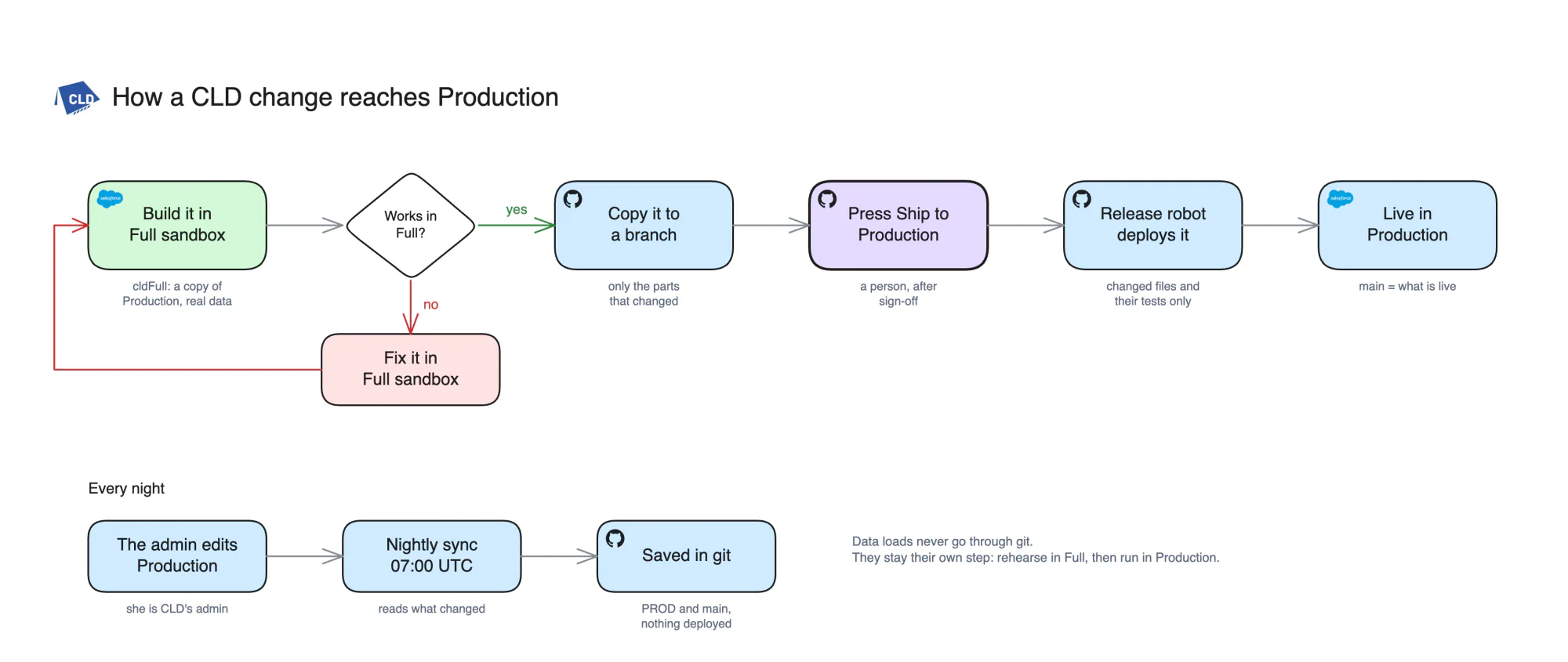
Reports and dashboardsData Processing EngineProgram Management - SandboxGitSign-offProductionShip to ProductionTestsPassedOrg diagramUpdatedAdmin edits in ProductionSaved to git nightly
Documentation and safe releases
Your admin knows how the org works and ships each change through a sandbox, so a fix for one program does not break registration for another.
- How the org works, drawn and written down from the org itself
- Changes built in a full sandbox, saved in git and shipped to Production by one press after sign-off
- A checklist and template sheet so your admin runs the next data load
Full sandboxGitHubSalesforce CLIIn productionDrawn for Center for Leadership Development from the org itself, with a load checklist and template sheet for the admin. The diagrams on this page come from that work.
- Which spring students still owe a registration fee?Here are the spring students with a fee due and no payment linked, by cohort.Read from Salesforce as you
Claude or ChatGPT for staff questions
Staff ask a plain question, such as which spring students still owe a fee, and get the answer from Salesforce with only the records their own login can see.
- Signed in as the staff member, so their permissions and sharing apply
- Read-only to start, with any change confirmed by a person first
- Answers from live records, not an exported spreadsheet
ClaudeChatGPTSalesforce MCPApexGenius
Screens are drawn for illustration. None of them shows a client's org or a real participant.
Gray and GAT were a pleasure to work with, knowledgeable about Salesforce and software development in general. They were able to complete client projects and always exceeded expectations. Would highly recommend them again!!!
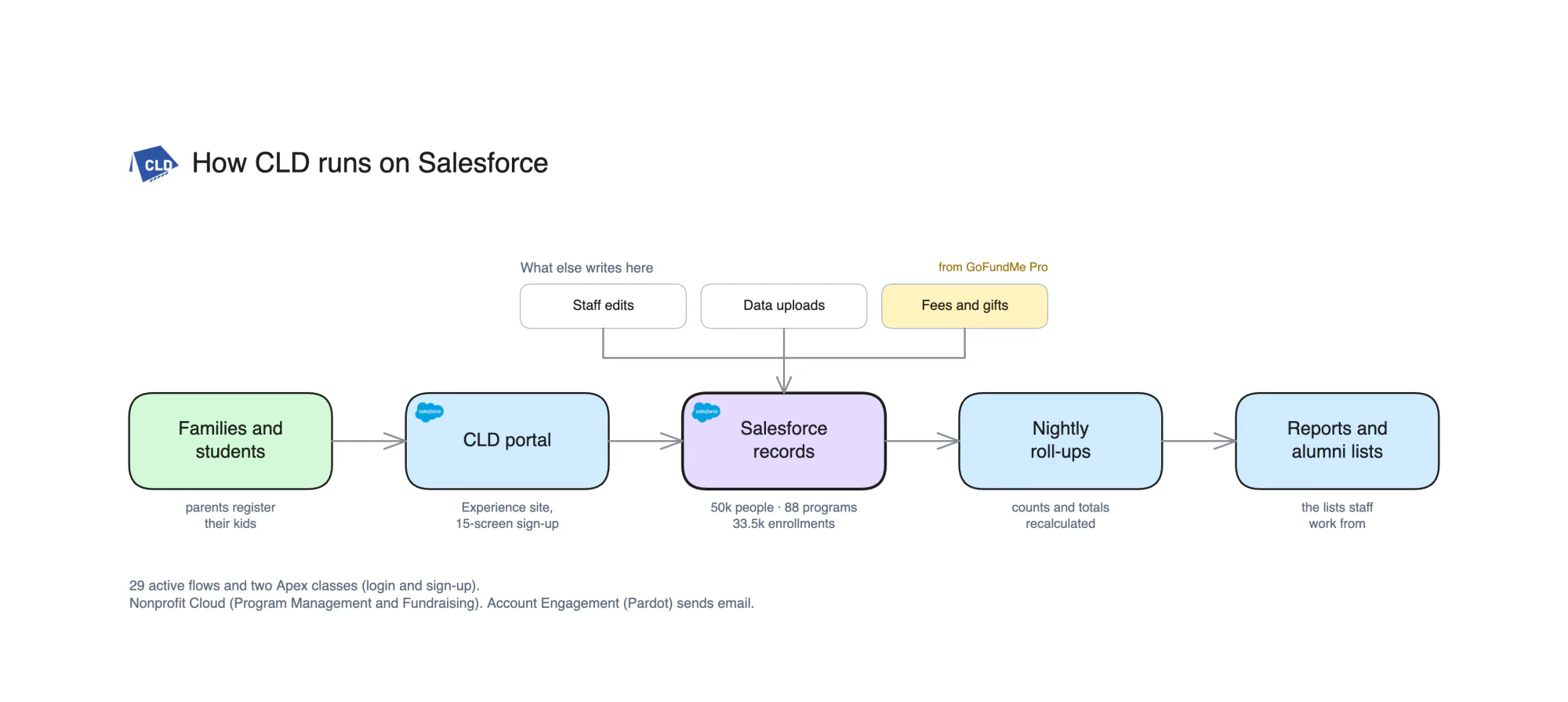
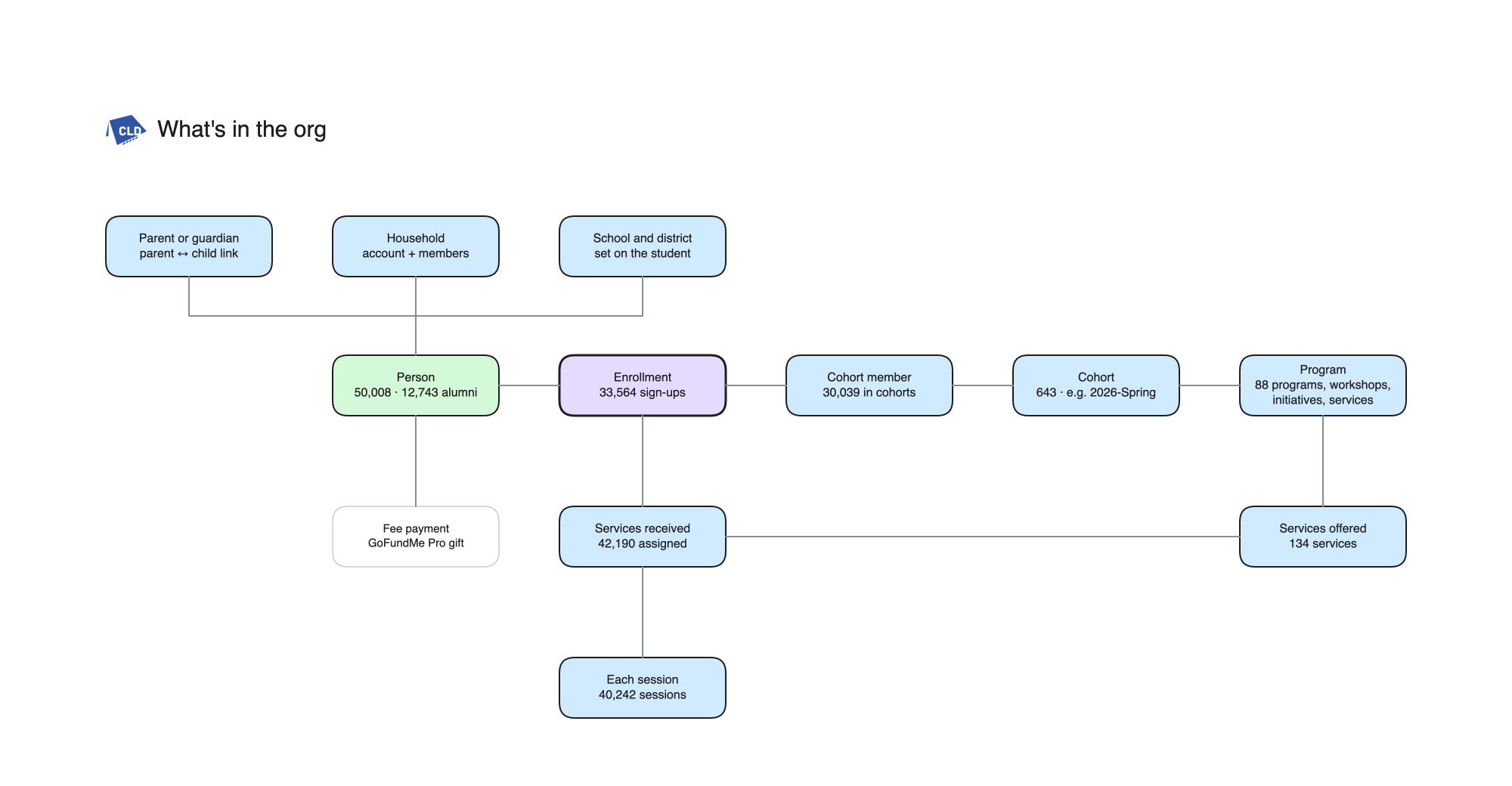
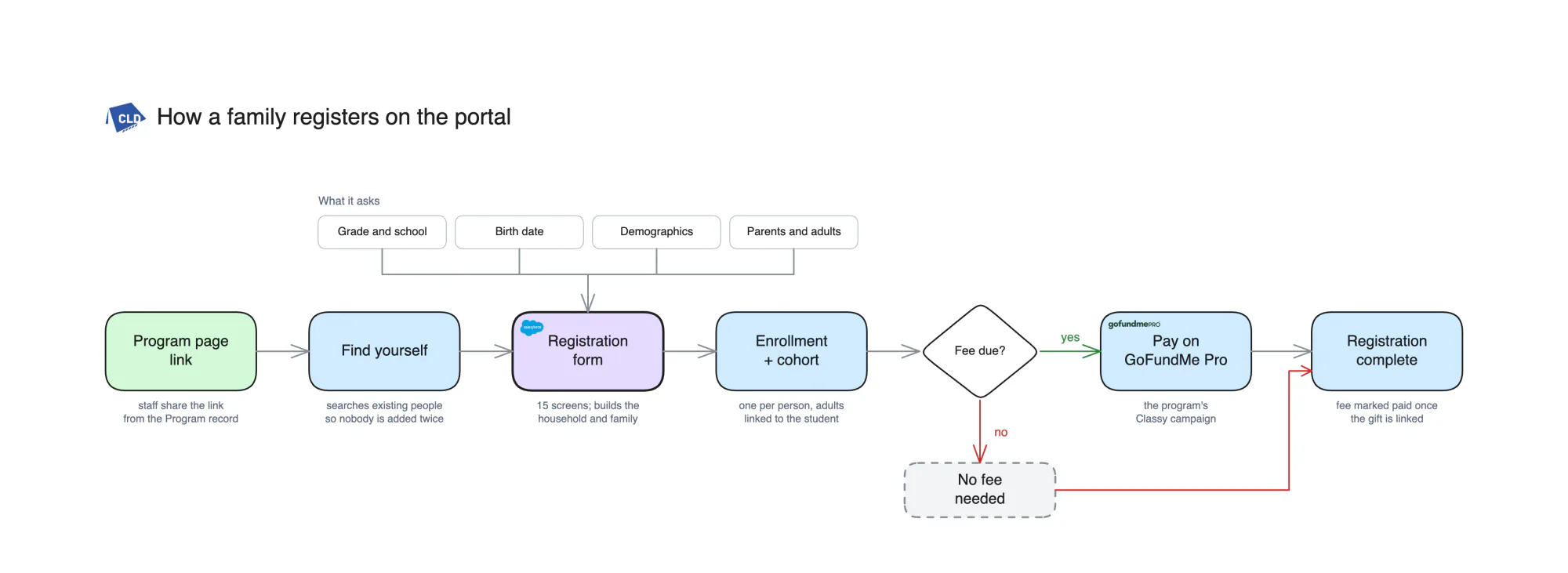
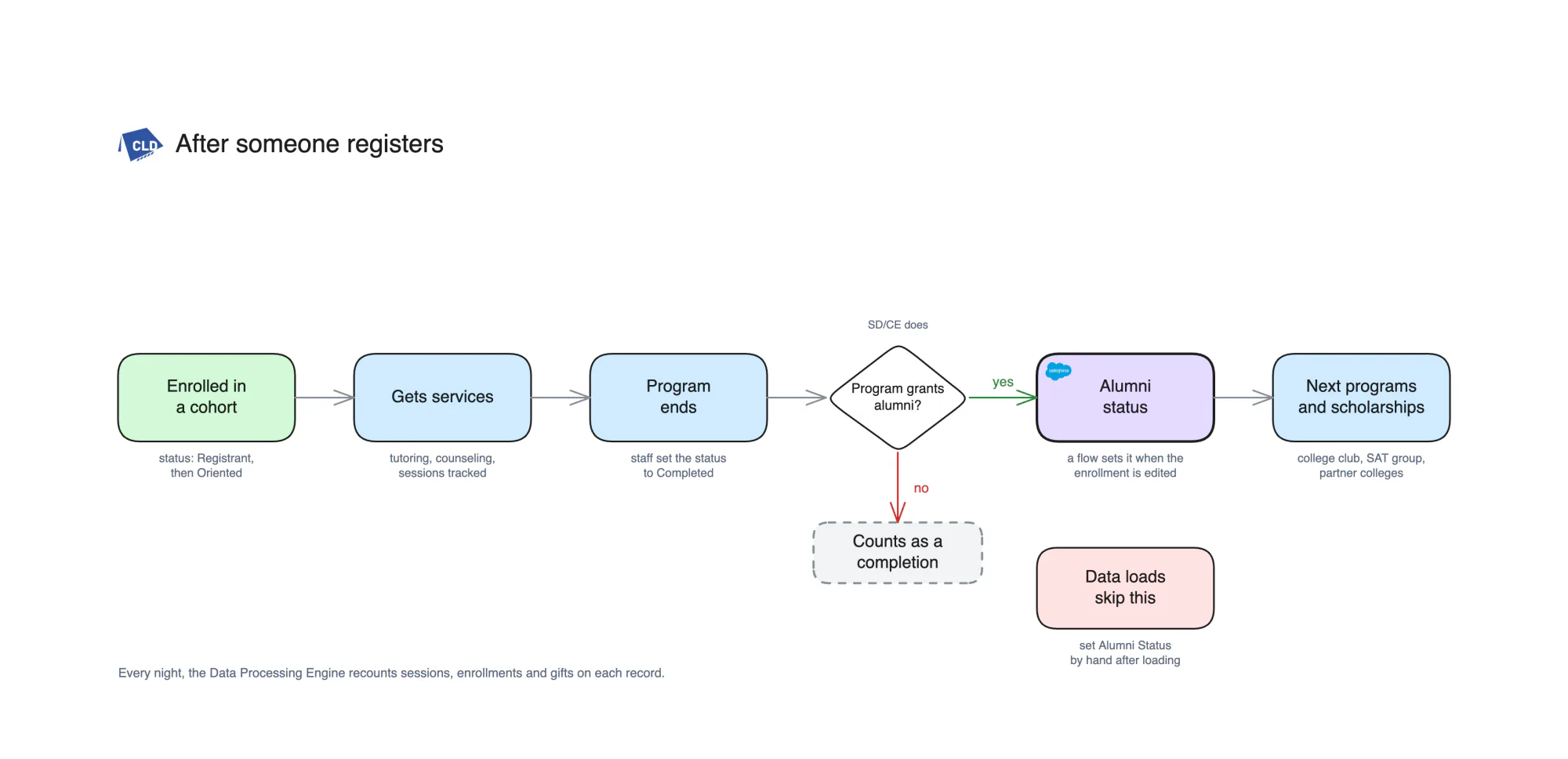
How Center for Leadership Development runs on Salesforce
Center for Leadership Development (CLD) is a youth leadership nonprofit on Nonprofit Cloud: Program Management for programs, cohorts, enrollments and services, Fundraising for gifts, and a family registration portal on an Experience Cloud site. The org and the portal were already live when we started. We drew and wrote down how the org works, ran the program data load with every person matched before anything was added, and wrote the checklist and template sheet the admin uses for the next load. The release path in the last diagram is the one we are setting up for the org. These six diagrams were drawn from CLD’s org during the engagement, with staff names removed and no participant data in any of them.
AI on a nonprofit org
Staff can ask Claude or ChatGPT about programs, families and gifts, signed in as themselves, so an answer holds only what their login can see. These pages cover how we connect them.
- Claude and SalesforceConnecting Claude to Salesforce through MCP: setup steps, security and costs.
- ChatGPT and SalesforceConnecting ChatGPT to Salesforce through MCP, with the connected user's permissions applied.
- ApexGeniusThe Salesforce MCP product we build and run. It keeps your apps, skills and memory in one connection, so your whole setup goes with you from agent to agent.
Works with
Salesforce Nonprofit CloudExperience CloudAccount Engagement Claude
 GitHub
Go deeper
- How to set up Salesforce CI/CD with GitHub Actions →The release path behind one-press deploys: changed files only, tests when Apex changes, no stored password.
- How to handle duplicate leads in Salesforce →Match before you create, then duplicate rules and merging: the same habits a program data load depends on.
- Mapping a live org before changing it →How we found competing automation inside a live Salesforce org before touching anything.
- Salesforce MCP security →Identity, permissions and sharing to check before an AI assistant reads participant records.
- Salesforce integration consulting →Giving, payment and marketing tools connected with monitored handoffs, retries and documented recovery paths.
- Salesforce managed services →Admin, development, integration and release support for teams with a backlog.
Questions
Do you work with Nonprofit Cloud?
Yes. The diagrams on this page come from an org on Nonprofit Cloud, with Program Management for programs, cohorts, enrollments and services, and Fundraising for gifts.
Can you load our program data without creating duplicates?
That is what the load plan is for. Each person is matched by name and birth date, by email and by the id from the old system before anything is added, and the load is rehearsed in a full sandbox first. Look-alikes that could be the same person are held for your staff to decide.
Will our own admin be able to run it afterwards?
Yes. We write a checklist and a template sheet for each kind of load, and your admin runs the next one with us beside them, so they can repeat it. The steps stay with your team as documents and diagrams.
Does participant data leave Salesforce?
The diagrams and documents carry counts only. They hold no participant names or records.
Can you build a registration portal for families?
Yes, on Experience Cloud. The family finds itself first so nobody is added twice, then one form creates the household, the enrollment, the cohort spot and the fee when one is due. If you already have a portal, we draw how it works today and test the whole path in a sandbox before changing it.
Do you connect GoFundMe Pro and other giving tools?
Yes. The org in the diagrams takes donations and registration fees through GoFundMe Pro's Salesforce package, so we know where those payments land. When we connect giving, each fee is linked to the student's enrollment, and payments that arrive without a match go on a list for staff to fix.
Can staff use Claude or ChatGPT with our Salesforce data?
Yes, with care. The assistant signs in as the staff member, so it sees only what that login can see, and we start read-only. The records a question needs are sent to the assistant to answer it, so we agree with you which objects it may read before anyone connects.
Book a call, or tell us where your data lives today.
Prefer to talk it through?
Pick a 30-minute time with Gray. Bring the spreadsheet or the report nobody trusts.